<?xml version="1.0" encoding="utf-8"?><feed xmlns="http://www.w3.org/2005/Atom" ><generator uri="https://jekyllrb.com/" version="3.10.0">Jekyll</generator><link href="https://shyble.github.io/feed.xml" rel="self" type="application/atom+xml" /><link href="https://shyble.github.io/" rel="alternate" type="text/html" /><updated>2026-07-08T12:47:27+00:00</updated><id>https://shyble.github.io/feed.xml</id><title type="html">Shyble</title><subtitle>Software Engineering Manager · AI Researcher · MSc Data Science</subtitle><author><name>Kürşat Kutlu Aydemir</name></author><entry><title type="html">Auto-Editing My YouTube Videos With an AI Agent</title><link href="https://shyble.github.io/blog/auto-editing-youtube-videos-with-an-ai-agent/" rel="alternate" type="text/html" title="Auto-Editing My YouTube Videos With an AI Agent" /><published>2026-07-08T00:00:00+00:00</published><updated>2026-07-08T00:00:00+00:00</updated><id>https://shyble.github.io/blog/auto-editing-youtube-videos-with-an-ai-agent</id><content type="html" xml:base="https://shyble.github.io/blog/auto-editing-youtube-videos-with-an-ai-agent/"><![CDATA[<p>How I turned a raw two-hour gameplay capture into a cut video, vertical Shorts, captions, and thumbnails by handing the grunt work to an OpenVole agent and a skill called <code class="language-plaintext highlighter-rouge">resolve-autocut</code>. I keep the judgment; the agent does the tedium.</p>

<p>Editing a gaming video is mostly janitorial work. You scrub through a long capture hunting for the good bits, cut the dead air where you’re loading a map or reading chat, hack out three vertical Shorts for the algorithm, burn captions, pick a thumbnail frame, and run it all through a loudness check so YouTube doesn’t crush your audio. None of that is <em>creative</em>. It’s the part between having good footage and having a video.</p>

<p>So I taught an agent to do it for me with an OpenVole <strong>Skill</strong> called <code class="language-plaintext highlighter-rouge">resolve-autocut</code>. <a href="https://github.com/openvole/openvole">OpenVole</a> 4.5.0 lets a skill ship runnable scripts alongside its instructions, and the agent runs them sandboxed.</p>

<h2 id="the-split-judgment-vs-grunt-work">The split: judgment vs. grunt work</h2>

<p>The whole design rests on one line from the skill’s own instructions. You do the <strong>judgment</strong> (thresholds, which moments matter, titles); the bundled scripts do the <strong>grunt work</strong> (silence detection, cutting, rendering).</p>

<p>That’s the contract. The agent never guesses at what’s funny or which clip is the money shot, I tell it, or it reads the transcript and asks. But detecting 400 silent gaps and trimming them frame-accurately? That’s a script’s job, not an LLM’s. <code class="language-plaintext highlighter-rouge">resolve-autocut</code> bundles a dozen small Python tools that lean on <strong>ffmpeg</strong> and <strong>DaVinci Resolve</strong>, and the agent orchestrates them.</p>

<p>It installs from <a href="https://github.com/openvole/volehub">VoleHub</a>, OpenVole’s skill registry, and that install fetches every file the skill bundles the <code class="language-plaintext highlighter-rouge">SKILL.md</code> playbook plus all scripts, verifying each against a per-file SHA-256 hash, so what lands on disk is exactly what was published. When the agent runs one of the scripts, <code class="language-plaintext highlighter-rouge">skill_run_script</code> confines it to the skill’s own directory with only the environment the skill declares (it needs <code class="language-plaintext highlighter-rouge">ffmpeg</code>, <code class="language-plaintext highlighter-rouge">ffprobe</code>, <code class="language-plaintext highlighter-rouge">python3</code>), never my full shell environment. I’ll cover the actual install command in the setup below.</p>

<h2 id="running-vole-server-and-preparing-video-editor-vole-agent">Running Vole Server and preparing video editor Vole agent</h2>

<p>OpenVole runs as a server, and every agent is a <strong>space</strong>; its own config, paws, identity, and data directory, isolated from everything else. I don’t want my video editor sharing a brain or a memory with my email agent, so it gets a dedicated one.</p>

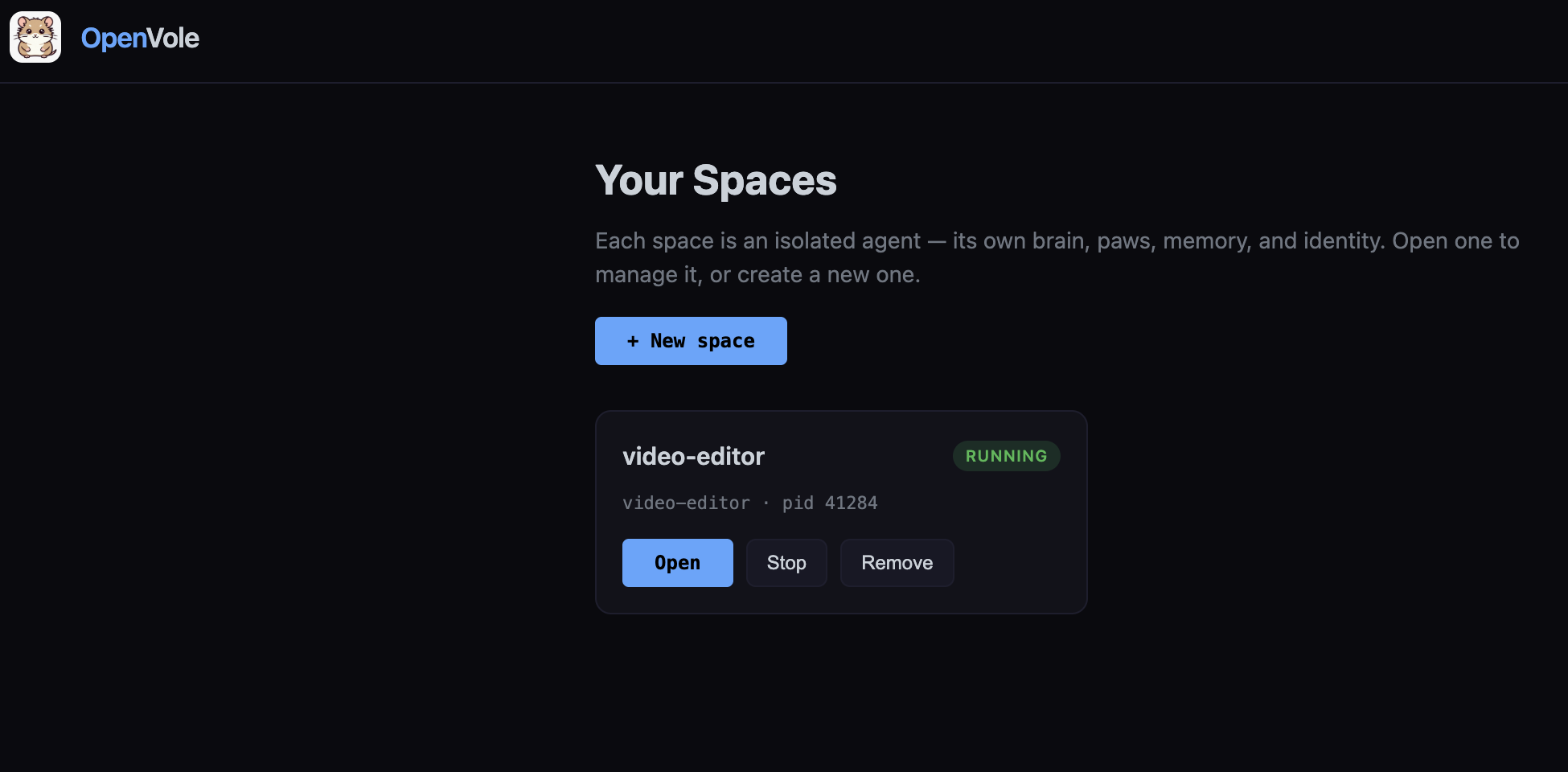
<p><img src="/images/blog/2026-07-08-auto-editing-youtube-videos-with-an-ai-agent/video-editor-dashboard-home.png" alt="OpenVole dashboard home — the video-editor space running under vole serve" />
<em>The <code class="language-plaintext highlighter-rouge">vole serve</code> dashboard home. Every agent is an isolated space with its own brain, paws, memory, and identity; here the <code class="language-plaintext highlighter-rouge">video-editor</code> space is up and running.</em></p>

<p>Start the control plane and create the space:</p>

<div class="language-bash highlighter-rouge"><div class="highlight"><pre class="highlight"><code>vole serve                       <span class="c"># one dashboard for every agent</span>
vole space create video-editor
</code></pre></div></div>

<p>The scripts shell out to a few tools, so those need to be on the machine first:</p>

<div class="language-bash highlighter-rouge"><div class="highlight"><pre class="highlight"><code>ffmpeg <span class="nt">-version</span>     <span class="c"># cutting, Shorts, thumbnails, loudness</span>
ffprobe <span class="nt">-version</span>    <span class="c"># media inspection</span>
python3 <span class="nt">--version</span>   <span class="c"># the skill's scripts</span>
whisper <span class="nt">--help</span>      <span class="c"># captions (or point WHISPER_CMD at your binary)</span>
<span class="c"># DaVinci Resolve Studio is optional - only the scripted timeline/render steps need it</span>
</code></pre></div></div>

<p>I built and tested all of this on <strong>macOS</strong> with exactly this setup, <code class="language-plaintext highlighter-rouge">ffmpeg</code>/<code class="language-plaintext highlighter-rouge">ffprobe</code> from Homebrew (<code class="language-plaintext highlighter-rouge">brew install ffmpeg</code>), Whisper installed via <code class="language-plaintext highlighter-rouge">pip</code>, and DaVinci Resolve. The ffmpeg-driven steps (analyze, Shorts, captions, thumbnails, loudness, QC) and the free-Resolve FCPXML path further down are what I actually ran end to end; only the scripted timeline/render steps need Resolve <strong>Studio</strong>. The paths in the config below are Mac-style, but nothing about the pipeline is platform-specific, Linux and Windows work the same way with adjusted paths.</p>

<p>Install the skill into the space:</p>

<div class="language-bash highlighter-rouge"><div class="highlight"><pre class="highlight"><code>vole skill <span class="nb">install </span>resolve-autocut
</code></pre></div></div>

<p>Now configure it. The two things that matter are <strong>where the footage lives</strong> and <strong>which paws it gets</strong>. A minimal <code class="language-plaintext highlighter-rouge">vole.config.json</code> for the space:</p>

<div class="language-json highlighter-rouge"><div class="highlight"><pre class="highlight"><code><span class="p">{</span><span class="w">
  </span><span class="nl">"brain"</span><span class="p">:</span><span class="w"> </span><span class="s2">"@openvole/paw-brain"</span><span class="p">,</span><span class="w">
  </span><span class="nl">"heartbeat"</span><span class="p">:</span><span class="w"> </span><span class="p">{</span><span class="w"> </span><span class="nl">"enabled"</span><span class="p">:</span><span class="w"> </span><span class="kc">true</span><span class="p">,</span><span class="w"> </span><span class="nl">"intervalMinutes"</span><span class="p">:</span><span class="w"> </span><span class="mi">180</span><span class="w"> </span><span class="p">},</span><span class="w">
  </span><span class="nl">"security"</span><span class="p">:</span><span class="w"> </span><span class="p">{</span><span class="w">
    </span><span class="nl">"sandboxFilesystem"</span><span class="p">:</span><span class="w"> </span><span class="kc">true</span><span class="p">,</span><span class="w">
    </span><span class="nl">"allowedPaths"</span><span class="p">:</span><span class="w"> </span><span class="p">[</span><span class="s2">"/Users/me/footage"</span><span class="p">]</span><span class="w">
  </span><span class="p">},</span><span class="w">
  </span><span class="nl">"paws"</span><span class="p">:</span><span class="w"> </span><span class="p">[</span><span class="w">
    </span><span class="p">{</span><span class="w">
      </span><span class="nl">"name"</span><span class="p">:</span><span class="w"> </span><span class="s2">"@openvole/paw-brain"</span><span class="p">,</span><span class="w">
      </span><span class="nl">"allow"</span><span class="p">:</span><span class="w"> </span><span class="p">{</span><span class="w">
        </span><span class="nl">"network"</span><span class="p">:</span><span class="w"> </span><span class="p">[</span><span class="s2">"*"</span><span class="p">],</span><span class="w">
        </span><span class="nl">"childProcess"</span><span class="p">:</span><span class="w"> </span><span class="kc">true</span><span class="p">,</span><span class="w">
        </span><span class="nl">"env"</span><span class="p">:</span><span class="w"> </span><span class="p">[</span><span class="s2">"BRAIN_PROVIDER"</span><span class="p">,</span><span class="w"> </span><span class="s2">"BRAIN_API_KEY"</span><span class="p">,</span><span class="w"> </span><span class="s2">"BRAIN_MODEL"</span><span class="p">]</span><span class="w">
      </span><span class="p">}</span><span class="w">
    </span><span class="p">},</span><span class="w">
    </span><span class="p">{</span><span class="w"> </span><span class="nl">"name"</span><span class="p">:</span><span class="w"> </span><span class="s2">"@openvole/paw-session"</span><span class="w"> </span><span class="p">},</span><span class="w">
    </span><span class="p">{</span><span class="w"> </span><span class="nl">"name"</span><span class="p">:</span><span class="w"> </span><span class="s2">"@openvole/paw-memory"</span><span class="w"> </span><span class="p">},</span><span class="w">
    </span><span class="p">{</span><span class="w"> </span><span class="nl">"name"</span><span class="p">:</span><span class="w"> </span><span class="s2">"@openvole/paw-compact"</span><span class="w"> </span><span class="p">}</span><span class="w">
  </span><span class="p">],</span><span class="w">
  </span><span class="nl">"skills"</span><span class="p">:</span><span class="w"> </span><span class="p">[</span><span class="s2">"volehub/resolve-autocut"</span><span class="p">]</span><span class="w">
</span><span class="p">}</span><span class="w">
</span></code></pre></div></div>

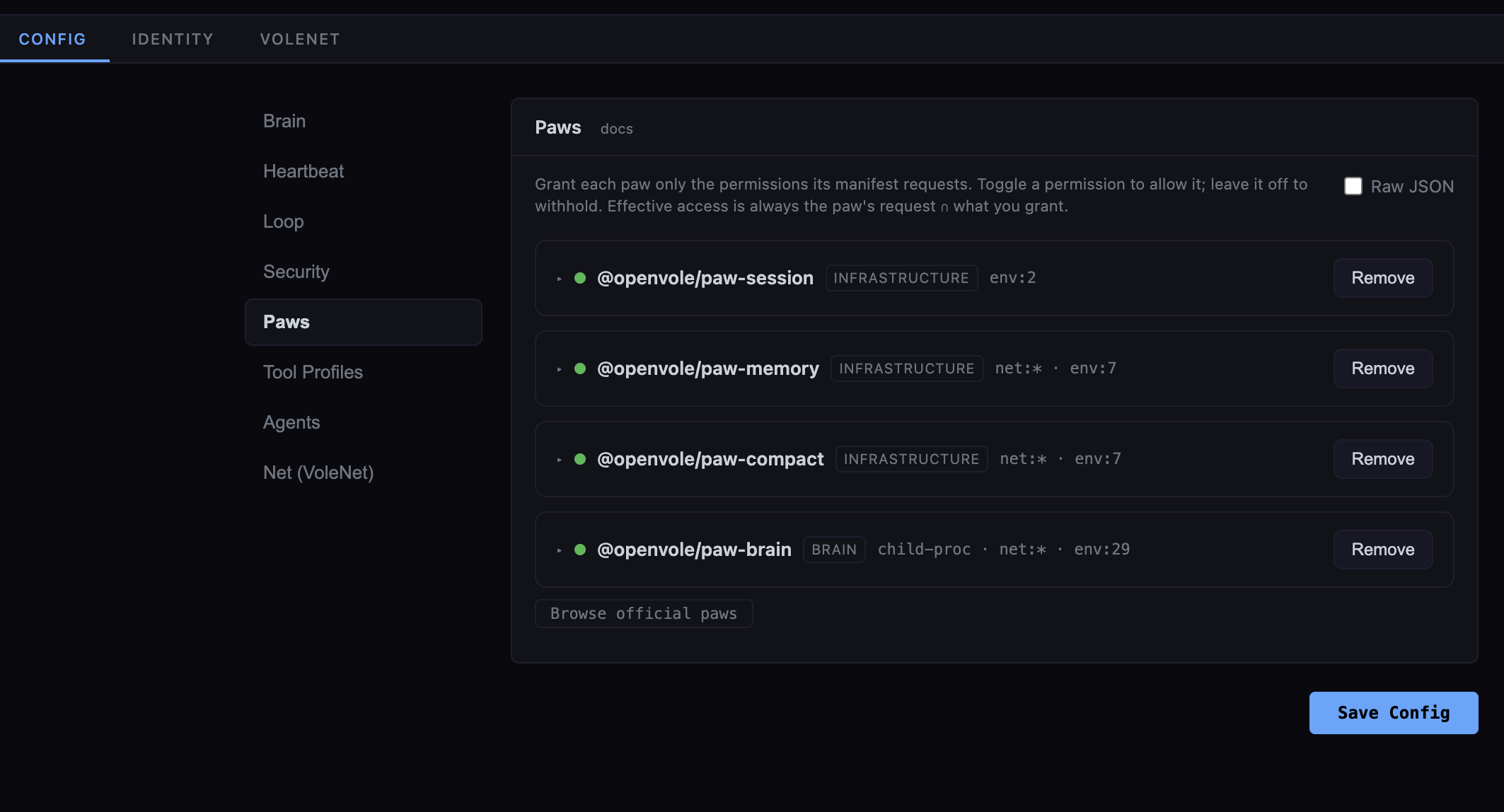
<p>That <code class="language-plaintext highlighter-rouge">allowedPaths</code> entry is what lets the agent reach my captures and write drafts back beside them. The four paws are the essentials, a brain to reason, plus session, memory, and compaction so it remembers what it’s working on across a long edit. Notably there’s <strong>no tool paw for the editing itself</strong>: <code class="language-plaintext highlighter-rouge">skill_run_script</code> is a <em>core</em> tool, so the skill activates the moment it’s installed and runs its scripts directly. Everything above is also editable from the <code class="language-plaintext highlighter-rouge">vole serve</code> dashboard, the Config tab is a structured form, and the Paws panel lets you grant or revoke each permission with a toggle.</p>

<p><img src="/images/blog/2026-07-08-auto-editing-youtube-videos-with-an-ai-agent/video-editor-new-paw-config.png" alt="The Config tab's Paws panel — each paw's requested permissions with per-permission toggles" />
<em>The Config tab’s new visual Paws panel: each paw shows what it is (brain, infrastructure) and the permissions it requests, and you grant or withhold each with a toggle. Effective access is always the paw’s request + what you grant.</em></p>

<p>Then I give it an identity and this is where a specialized agent really takes shape. Instead of cramming everything into one giant prompt, OpenVole splits a space’s brief across a few small Markdown files in its <code class="language-plaintext highlighter-rouge">.openvole/</code> directory, each answering a different question. The core stitches them together with the skill list, the available tools, and the agent’s memory into the system prompt it hands the brain on every turn:</p>

<ul>
  <li><strong><code class="language-plaintext highlighter-rouge">AGENT.md</code></strong>: <em>what it is and what it does.</em> The agent’s general role and default workflow, the same for every video. It also points the agent at per-project instructions (more on that in a moment).</li>
  <li><strong><code class="language-plaintext highlighter-rouge">SOUL.md</code></strong>: <em>how it behaves.</em> Temperament and hard rules.</li>
  <li><strong><code class="language-plaintext highlighter-rouge">USER.md</code></strong>: <em>who it serves.</em> Who I am and how I want drafts delivered.</li>
  <li><strong><code class="language-plaintext highlighter-rouge">HEARTBEAT.md</code></strong>: <em>what it does on a schedule</em>, without being asked.</li>
</ul>

<p>(There’s also a <code class="language-plaintext highlighter-rouge">BRAIN.md</code> for overriding the base system prompt wholesale, but for a specialized agent the four above are all you touch.)</p>

<p>The <code class="language-plaintext highlighter-rouge">AGENT.md</code> is the agent’s <em>general</em> operating manual, its role and defaults, identical across every video. For the editor, mine reads:</p>

<div class="language-markdown highlighter-rouge"><div class="highlight"><pre class="highlight"><code><span class="gh"># Video Editor</span>

You edit raw gameplay captures into YouTube-ready videos with the
<span class="sb">`resolve-autocut`</span> skill. Footage lives in /Users/me/footage.

Default workflow for a new capture:
<span class="p">1.</span> Analyze for silence + loud moments, then STOP and let me review the cuts.
<span class="p">2.</span> Once I approve: build the timeline, transcribe captions, cut 3 Shorts,
   propose 5 thumbnails, normalize to -14 LUFS, run QC.
<span class="p">3.</span> Never publish. Hand me drafts and a short summary of what you changed.

For a specific video, first read <span class="sb">`project.md`</span> in that video's folder for its
creative direction; treat the steps above as the defaults when there isn't one.

Ask before guessing at silence thresholds or which moments matter.
</code></pre></div></div>

<p>Notice what that file is really doing: it encodes the <em>human-in-the-loop</em> points as instructions. “STOP and let me review the cuts”, “never publish”, those aren’t enforced by the framework, they’re the agent’s standing orders. The judgment-vs-grunt-work split I described earlier lives here, in plain English.</p>

<p>There’s a deliberate split in that last line worth calling out, because it’s the practice I’d recommend. <code class="language-plaintext highlighter-rouge">AGENT.md</code> is <em>general</em> and it belongs to the agent’s OpenVole setup and stays the same whether I’m cutting a hardcore Minecraft series or a racing montage. But the <em>creative</em> direction for a given video changes per project, and that doesn’t belong in the vole identity at all. So I keep a plain <strong><code class="language-plaintext highlighter-rouge">project.md</code></strong> in each project’s own folder which is a custom brief, completely outside OpenVole’s config and <code class="language-plaintext highlighter-rouge">AGENT.md</code> just tells the agent to go read it:</p>

<div class="language-markdown highlighter-rouge"><div class="highlight"><pre class="highlight"><code><span class="gh"># project.md - Hardcore Minecraft series</span>
<span class="p">-</span> Cold open on the first death or near-death, no talking intro.
<span class="p">-</span> Keep my "let's get into it" line only if it lands in the first 30s.
<span class="p">-</span> Shorts: favor clutch and fail moments over exposition.
<span class="p">-</span> Thumbnails: my shocked face + a red arrow; never a spoiler frame.
<span class="p">-</span> Chapter titles: playful, lowercase.
</code></pre></div></div>

<p>That separation is the point. <code class="language-plaintext highlighter-rouge">AGENT.md</code> says <em>how to be a video editor for me</em>; <code class="language-plaintext highlighter-rouge">project.md</code> says <em>what this particular series is about</em>. The same editor agent then produces on-brand cuts for a hardcore series and a completely different racing channel, I just drop a different <code class="language-plaintext highlighter-rouge">project.md</code> beside each project’s footage. The agent stays general and reusable; the project brief travels with the video, lives wherever I keep the footage, and is mine to version however I like, with no OpenVole config involved.</p>

<p>A short <code class="language-plaintext highlighter-rouge">SOUL.md</code> keeps it from getting ahead of itself - this is where “don’t touch my originals” goes:</p>

<div class="language-markdown highlighter-rouge"><div class="highlight"><pre class="highlight"><code><span class="gh"># Temperament</span>
Careful and literal. This is my footage and my channel, never publish,
never overwrite an original file, never delete a draft without asking.
When a threshold or a creative call is ambiguous, stop and ask instead of
guessing. Always report what you changed, with before/after durations.
</code></pre></div></div>

<p>And because I drop new captures into the same folder, a <code class="language-plaintext highlighter-rouge">HEARTBEAT.md</code> turns the editor from reactive to proactive with <code class="language-plaintext highlighter-rouge">heartbeat</code> enabled in the config (above), the agent wakes on its interval, reads this file, and acts on its own:</p>

<div class="language-markdown highlighter-rouge"><div class="highlight"><pre class="highlight"><code><span class="gh"># Recurring jobs</span>
<span class="p">-</span> Every few hours, scan /Users/me/footage for a capture with no matching
  draft yet. If you find one, run analyze and send me the loud-moment
  summary and the proposed cuts, then wait for my go-ahead before rendering.
</code></pre></div></div>

<p>I set all of these two interchangeable ways: edit the files directly under the space’s <code class="language-plaintext highlighter-rouge">.openvole/</code> folder, or use the <strong>Identity</strong> tab in the <code class="language-plaintext highlighter-rouge">vole serve</code> dashboard, which reads and writes the very same files. The space loads them when its engine starts, so after I change a brief I <strong>restart the space</strong>, one click in the dashboard, and the new instructions are live. (Config changes like adding a paw also need that restart; it’s the same button.) Because each file is small and single-purpose, I can hand the same <code class="language-plaintext highlighter-rouge">SOUL.md</code> to a second editor for another channel while swapping in a different <code class="language-plaintext highlighter-rouge">USER.md</code> and <code class="language-plaintext highlighter-rouge">AGENT.md</code>.</p>

<p>Start it, and hand it a job in chat:</p>

<div class="language-bash highlighter-rouge"><div class="highlight"><pre class="highlight"><code>vole space start video-editor
</code></pre></div></div>

<blockquote>
  <p>“New capture at <code class="language-plaintext highlighter-rouge">/Users/me/footage/raid-night.mp4</code>, analyze it and show me the cuts.”</p>
</blockquote>

<p>That’s the whole setup: a dedicated agent, pointed at a folder, that knows it’s a video editor. From here, everything it does is the skill’s pipeline and it’s worth seeing what that actually runs under the hood.</p>

<h2 id="the-core-pipeline-analyze--review--render">The core pipeline: analyze → review → render</h2>

<p>Every job starts the same way. Point the analyzer at the raw file:</p>

<div class="language-bash highlighter-rouge"><div class="highlight"><pre class="highlight"><code>python3 scripts/analyze.py raw-gameplay.mp4 <span class="nt">--out</span> cutlist.json
</code></pre></div></div>

<p>This does two things at once. It walks the audio and marks every silent stretch, the stuff to cut, producing a <strong>keep-list</strong>. And it finds the <strong>loud moments</strong>: the spikes where I laughed, yelled, or something exploded. Those loud timestamps become the highlight markers, and later they seed the Shorts and thumbnails.</p>

<p>The thresholds matter, and they’re per-game. A chatty commentary video wants <code class="language-plaintext highlighter-rouge">--db -35</code> and a generous <code class="language-plaintext highlighter-rouge">--pad 0.15</code> so cuts don’t clip the start of a word. A loud, effects-heavy game needs a lower bar, maybe <code class="language-plaintext highlighter-rouge">--db -30</code>, or the whole track reads as “loud” and nothing gets cut. This is the first place the agent stops and checks with me instead of charging ahead, bad thresholds eat punchlines, and there’s no undoing that after the render.</p>

<p>Then it builds the timeline in Resolve from the keep-list, dropping highlight markers as it goes:</p>

<div class="language-bash highlighter-rouge"><div class="highlight"><pre class="highlight"><code>python3 scripts/build_timeline.py <span class="nt">--cutlist</span> cutlist.json <span class="nt">--timeline</span> <span class="s2">"Auto Cut"</span>
</code></pre></div></div>

<p>On the first pass for a new game, the skill deliberately <strong>stops here</strong> and asks me to eyeball the cuts. If a threshold ate a beat, we re-analyze with a tweak. Only once I approve does it render:</p>

<div class="language-bash highlighter-rouge"><div class="highlight"><pre class="highlight"><code>python3 scripts/render.py <span class="nt">--outdir</span> drafts <span class="nt">--name</span> MyVideo <span class="nt">--preset</span> <span class="s2">"YouTube 1080p"</span>
</code></pre></div></div>

<p>Cut, reviewed, rendered. That’s the spine. Everything else is a payoff you bolt on top.</p>

<h2 id="the-payoffs">The payoffs</h2>

<p><strong>Captions.</strong> A Whisper pass transcribes the audio to an <code class="language-plaintext highlighter-rouge">.srt</code> (and a <code class="language-plaintext highlighter-rouge">.json</code> I reuse later):</p>

<div class="language-bash highlighter-rouge"><div class="highlight"><pre class="highlight"><code>python3 scripts/transcribe.py MyVideo.mp4 <span class="nt">--outdir</span> captions <span class="nt">--model</span> base
</code></pre></div></div>

<p>The transcript does double duty; it’s captions <em>and</em> it’s how the agent finds the best Shorts. “no way”, “let’s go”, a burst of laughter: those phrases in the transcript, lined up against the loud moments from <code class="language-plaintext highlighter-rouge">analyze</code>, are how you pick a clip that actually pops instead of a random 30 seconds.</p>

<p><strong>Shorts / Reels.</strong> This is the one YouTubers care about most, and it’s where I spent the most care. It cuts vertical <strong>1080×1920</strong> clips centered on the loudest moments:</p>

<div class="language-bash highlighter-rouge"><div class="highlight"><pre class="highlight"><code>python3 scripts/shorts.py MyVideo.mp4 <span class="nt">--cutlist</span> cutlist.json <span class="nt">--count</span> 3
</code></pre></div></div>

<p>If you recorded a facecam alongside the gameplay, you can composite it into a corner of each Short, cut to the same instant:</p>

<div class="language-bash highlighter-rouge"><div class="highlight"><pre class="highlight"><code>python3 scripts/shorts.py MyVideo.mp4 <span class="nt">--at</span> 286 <span class="nt">--pre</span> 0 <span class="nt">--post</span> 45 <span class="se">\</span>
  <span class="nt">--overlay</span> cam.mp4 <span class="nt">--overlay-scale</span> 0.30 <span class="nt">--overlay-corner</span> bottom-left
</code></pre></div></div>

<p>Both sources are assumed to start aligned at zero, so the same window cuts each in lockstep. (A subtlety I had to fix the hard way: a 30 fps facecam and 60 fps gameplay don’t start on the same frame after seeking, so the cam popped in a few frames late, zeroing each stream’s timestamps fixed it.) And a nice touch; the Short’s audio comes from whichever track carries your commentary, so you point it at the gameplay file and the facecam can stay silent.</p>

<p><strong>Thumbnails.</strong> It pulls candidate frames from the highlight moments so you’re choosing from your best expressions, not scrubbing blind:</p>

<div class="language-bash highlighter-rouge"><div class="highlight"><pre class="highlight"><code>python3 scripts/thumbnails.py MyVideo.mp4 <span class="nt">--cutlist</span> cutlist.json <span class="nt">--count</span> 5
</code></pre></div></div>

<p><strong>Titles, description, chapters, tags.</strong> These the agent writes itself, from the transcript, chapters are just the timestamps where the topic or scene changes. <strong>Loudness</strong> gets normalized to YouTube’s <code class="language-plaintext highlighter-rouge">-14 LUFS</code> target if the source is quiet or uneven. And a <strong>QC</strong> pass flags black frames, freezes, and dead audio on the draft before it ever tells me it’s ready.</p>

<p>No DaVinci Resolve Studio? There’s still a path The timeline-building and rendering steps need <strong>Resolve Studio</strong>, because only the paid version can be scripted. But the free version imports timelines, so the skill can build the whole cut, including a synced facecam track, as an <strong>FCPXML</strong> you import by hand:</p>

<div class="language-bash highlighter-rouge"><div class="highlight"><pre class="highlight"><code>python3 scripts/export_fcpxml.py <span class="nt">--cutlist</span> cutlist.json <span class="se">\</span>
  <span class="nt">--overlay</span> cam.mp4 <span class="nt">--overlay-scale</span> 0.25
</code></pre></div></div>

<p>Then in Resolve: <strong>File → Import → Timeline</strong>, and the cuts and both tracks come in ready to render. You may want to adjust a facecam video position or add more content to the final cut.</p>

<p>It won’t tell you if your video is <em>good</em>. It won’t write your hook or find the joke. It cuts silence, so if your pacing lives in the pauses, tune <code class="language-plaintext highlighter-rouge">--db</code> and <code class="language-plaintext highlighter-rouge">--pad</code> or you’ll lose it. And it never auto-publishes, the skill produces drafts, reports what it did (cuts made, duration before and after, Shorts, QC issues), and hands it back to me to approve the final render and upload. That’s on purpose. The agent is a very fast, very literal editor’s assistant, not a creative director.</p>

<p>If you record gameplay and dread the edit, that’s the pitch. Install <a href="https://github.com/openvole/openvole">OpenVole</a>, <code class="language-plaintext highlighter-rouge">vole skill install resolve-autocut</code>, point it at your capture, and go make the next one while the agent cleans up this one.</p>]]></content><author><name>Kürşat Kutlu Aydemir</name></author><category term="OpenVole" /><category term="YouTube" /><category term="AI agents" /><category term="Video editing" /><category term="DaVinci Resolve" /><summary type="html"><![CDATA[How I turned a raw two-hour gameplay capture into a cut video, vertical Shorts, captions, and thumbnails by handing the grunt work to an OpenVole agent and a skill called resolve-autocut. I keep the judgment; the agent does the tedium.]]></summary></entry><entry><title type="html">Running an OpenVole Server From Scratch</title><link href="https://shyble.github.io/blog/openvole-from-scratch/" rel="alternate" type="text/html" title="Running an OpenVole Server From Scratch" /><published>2026-06-23T00:00:00+00:00</published><updated>2026-06-23T00:00:00+00:00</updated><id>https://shyble.github.io/blog/openvole-from-scratch</id><content type="html" xml:base="https://shyble.github.io/blog/openvole-from-scratch/"><![CDATA[<p><em>A complete, step-by-step walkthrough: install OpenVole, stand up the server, create your first agent, wire in the four essential paws — brain, session, memory, compact — and go through every section of the Config tab. By the end you’ll have a working, self-hosted agent you control end to end.</em></p>

<p><a href="https://github.com/openvole/openvole">OpenVole</a> (v4.3 as I write this) runs as a <strong>server</strong>. You start it once, and a single control-plane dashboard lets you create and operate any number of agents — each one an isolated <strong>space</strong> with its own config, paws, identity, and data. Everything runs on your machine, against whatever LLM you point it at. Here’s the whole path from nothing to a running agent.</p>

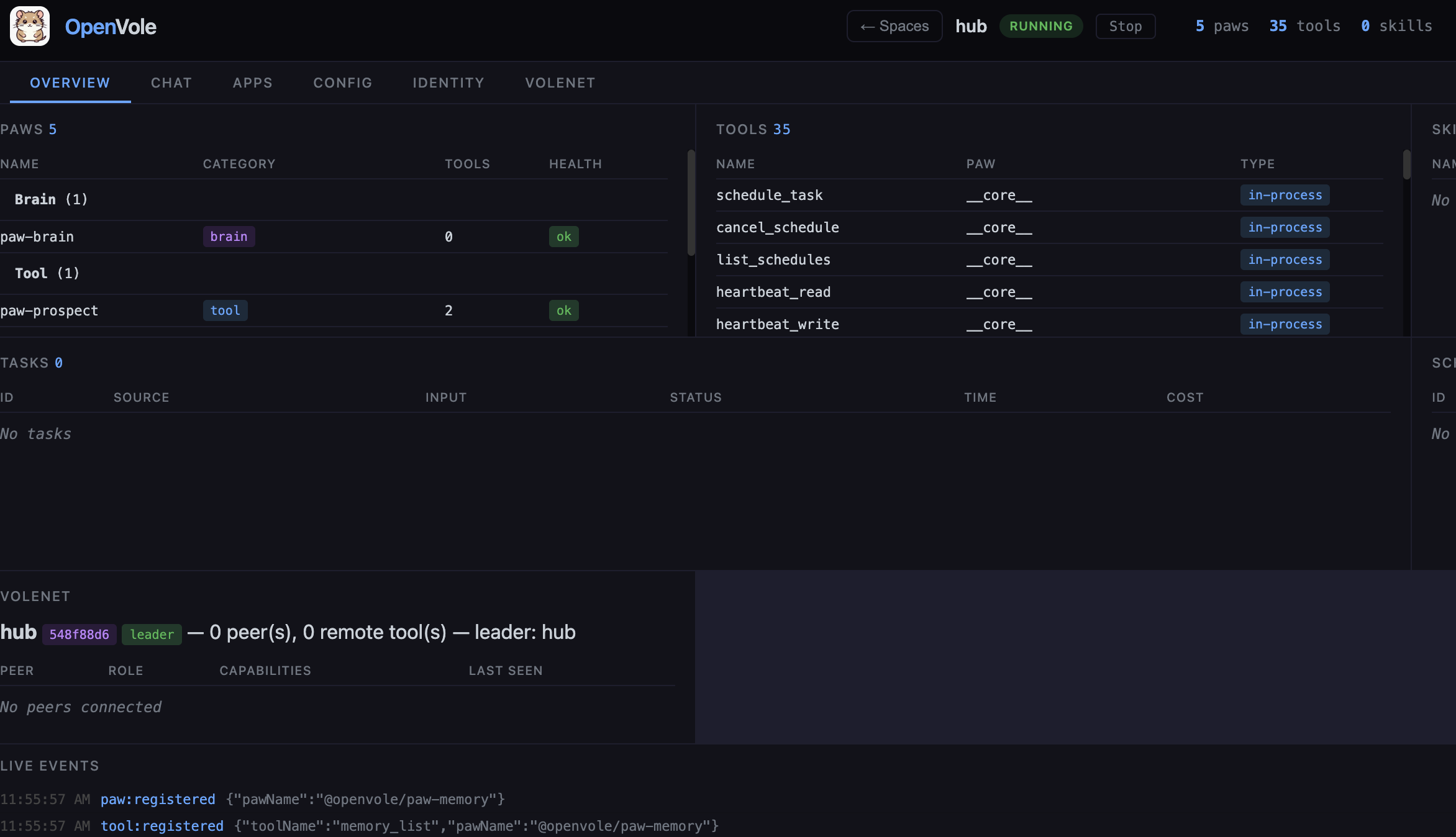
<p><img src="/images/blog/2026-06-23-openvole-from-scratch/ov-dashboard.png" alt="OpenVole dashboard — a running space's Overview tab" />
<em>The <code class="language-plaintext highlighter-rouge">openvole serve</code> control plane: a running space’s <strong>Overview</strong> tab — its paws, tools, tasks, VoleNet status, and a live event stream, all in the browser.</em></p>

<h2 id="1-install">1. Install</h2>

<p>You need <strong>Node.js 20 or newer</strong>. Install the CLI globally:</p>

<div class="language-bash highlighter-rouge"><div class="highlight"><pre class="highlight"><code>npm <span class="nb">install</span> <span class="nt">-g</span> openvole@latest
openvole <span class="nt">--version</span>
</code></pre></div></div>

<blockquote>
  <p>Prefer not to install globally? Every command below also works with <code class="language-plaintext highlighter-rouge">npx openvole …</code>. (<code class="language-plaintext highlighter-rouge">vole</code> is kept as an alias, but <code class="language-plaintext highlighter-rouge">openvole</code> is the canonical name.)</p>
</blockquote>

<h2 id="2-start-openvole-server--create-an-agent-root">2. Start OpenVole server &amp; create an agent root</h2>

<p>Pick an <strong>empty directory</strong> to hold your agents. An empty directory becomes a new OpenVole <strong>root</strong> the first time you serve from it:</p>

<div class="language-bash highlighter-rouge"><div class="highlight"><pre class="highlight"><code><span class="nb">mkdir</span> ~/my-agents <span class="o">&amp;&amp;</span> <span class="nb">cd</span> ~/my-agents
openvole serve
</code></pre></div></div>

<p>You’ll see something like:</p>

<div class="language-plaintext highlighter-rouge"><div class="highlight"><pre class="highlight"><code>OpenVole root: /Users/you/my-agents  (new)
Manage your spaces at http://localhost:3000/?token=8f3c…b1a9
</code></pre></div></div>

<p>A few things just happened, and they matter:</p>

<ul>
  <li><strong>The root</strong> is <code class="language-plaintext highlighter-rouge">~/my-agents</code>. Your spaces live under <code class="language-plaintext highlighter-rouge">~/my-agents/spaces/&lt;name&gt;/</code>, and a <code class="language-plaintext highlighter-rouge">spaces.json</code> registry tracks them. (To pin a fixed root from anywhere, set <code class="language-plaintext highlighter-rouge">VOLE_HOME=~/my-agents</code>.)</li>
  <li><strong>The dashboard is gated by a session token.</strong> As of v4.3 the control plane isn’t open just because you can reach the port — you need that <code class="language-plaintext highlighter-rouge">?token=…</code>. It’s generated once and persisted at <code class="language-plaintext highlighter-rouge">~/my-agents/.openvole/dashboard-token</code>, so the URL stays stable across restarts. Override it with <code class="language-plaintext highlighter-rouge">VOLE_DASHBOARD_TOKEN</code>.</li>
  <li><strong>It binds all interfaces by default</strong> (<code class="language-plaintext highlighter-rouge">0.0.0.0</code>) for convenience, but the token gates access. On a public box, restrict it: <code class="language-plaintext highlighter-rouge">VOLE_DASHBOARD_HOST=127.0.0.1 openvole serve</code>, and firewall or tunnel the port. Change the port with <code class="language-plaintext highlighter-rouge">VOLE_DASHBOARD_PORT</code>.</li>
</ul>

<p>Open that tokenized URL in your browser and you’ve got the dashboard.</p>

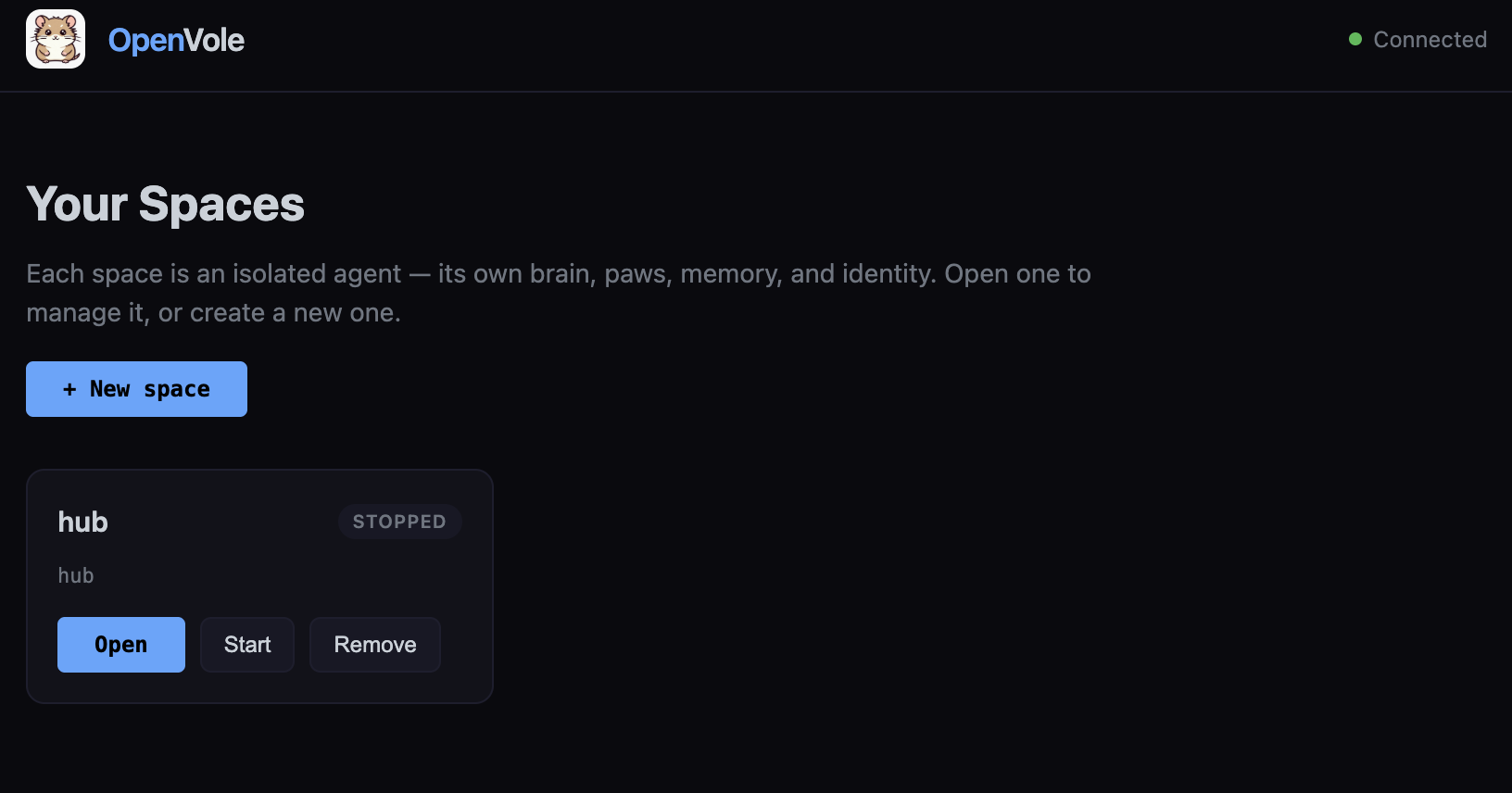
<p><img src="/images/blog/2026-06-23-openvole-from-scratch/ov-spaces.png" alt="OpenVole dashboard — the Your Spaces launcher" />
<em>The dashboard opens to <strong>Your Spaces</strong> — each card is an isolated agent. Click <strong>New space</strong> to create one.</em></p>

<blockquote>
  <p>In a hurry? A preset does steps 2–4 for you: <code class="language-plaintext highlighter-rouge">curl -fsSL https://raw.githubusercontent.com/openvole/openvole/main/presets/basic.sh | bash</code>. But doing it by hand once is worth it.</p>
</blockquote>

<h2 id="3-create-a-space-and-add-the-essential-paws">3. Create a space and add the essential paws</h2>

<p>A <strong>fresh OpenVole install has zero capabilities</strong> — no LLM, no memory, no tools. That’s by design: the core is just the agent loop, and everything useful is a <strong>paw</strong> (a sandboxed plugin) you opt into.</p>

<p>In the dashboard, click <strong>New space</strong>, give it a name (<code class="language-plaintext highlighter-rouge">assistant</code>), and create it. The <strong>onboarding</strong> step that pops up offers the essentials, pre-checked:</p>

<ul>
  <li><code class="language-plaintext highlighter-rouge">@openvole/paw-brain</code></li>
  <li><code class="language-plaintext highlighter-rouge">@openvole/paw-session</code></li>
  <li><code class="language-plaintext highlighter-rouge">@openvole/paw-memory</code></li>
  <li><code class="language-plaintext highlighter-rouge">@openvole/paw-compact</code></li>
  <li><code class="language-plaintext highlighter-rouge">@openvole/paw-shell</code></li>
</ul>

<p>Leave the four we care about checked and <strong>Install</strong>. Each paw is <code class="language-plaintext highlighter-rouge">npm install</code>-ed into the space’s own directory and registered in its <code class="language-plaintext highlighter-rouge">vole.config.json</code>. (You can add or remove paws later from the <strong>Config → Paws</strong> section, or from the space directory with <code class="language-plaintext highlighter-rouge">openvole paw add &lt;name&gt;</code>.)</p>

<h2 id="4-configure-the-brain-the-env">4. Configure the brain (the <code class="language-plaintext highlighter-rouge">.env</code>)</h2>

<p>The brain needs an LLM and a key, and <strong>secrets live on the server, not in the browser</strong> — so this one step happens in a file. A new space ships with a minimal <code class="language-plaintext highlighter-rouge">.env</code> (just logging). Open it:</p>

<div class="language-bash highlighter-rouge"><div class="highlight"><pre class="highlight"><code><span class="nv">$EDITOR</span> ~/my-agents/spaces/assistant/.env
</code></pre></div></div>

<p>Add a provider and its key. <code class="language-plaintext highlighter-rouge">@openvole/paw-brain</code> is a single adapter that speaks to all the major providers — you choose with <code class="language-plaintext highlighter-rouge">BRAIN_PROVIDER</code>:</p>

<div class="language-bash highlighter-rouge"><div class="highlight"><pre class="highlight"><code><span class="c"># --- pick ONE provider ---</span>

<span class="c"># Local &amp; free (no key) — needs Ollama running:</span>
<span class="nv">BRAIN_PROVIDER</span><span class="o">=</span>ollama
<span class="nv">OLLAMA_HOST</span><span class="o">=</span>http://localhost:11434
<span class="nv">OLLAMA_MODEL</span><span class="o">=</span>qwen3:8b

<span class="c"># …or Anthropic:</span>
<span class="c"># BRAIN_PROVIDER=anthropic</span>
<span class="c"># ANTHROPIC_API_KEY=sk-ant-...</span>
<span class="c"># ANTHROPIC_MODEL=claude-sonnet-4-6     # optional</span>

<span class="c"># …or OpenAI:</span>
<span class="c"># BRAIN_PROVIDER=openai</span>
<span class="c"># OPENAI_API_KEY=sk-...</span>

<span class="c"># …or Gemini:</span>
<span class="c"># BRAIN_PROVIDER=gemini</span>
<span class="c"># GEMINI_API_KEY=...</span>
</code></pre></div></div>

<p>If you don’t set <code class="language-plaintext highlighter-rouge">BRAIN_PROVIDER</code>, the brain auto-detects one from whichever API key is present. You can also set a <strong>fallback</strong> (<code class="language-plaintext highlighter-rouge">BRAIN_FALLBACK=openai</code>, etc.) that kicks in if the primary provider errors. For a dry run with no LLM at all, <code class="language-plaintext highlighter-rouge">BRAIN_PROVIDER=mock</code> gives deterministic canned replies.</p>

<h2 id="the-four-essential-paws-and-what-each-one-does">The four essential paws, and what each one does</h2>

<p>These four are what turn the bare loop into a real assistant:</p>

<ul>
  <li><strong><code class="language-plaintext highlighter-rouge">paw-brain</code> — the Think step.</strong> The core is LLM-ignorant; the brain is the paw that actually calls the model and turns context into a plan. One unified adapter, five real providers (Anthropic, OpenAI, Gemini, Ollama, xAI) plus <code class="language-plaintext highlighter-rouge">mock</code>, with optional fallback. Configured entirely through the env vars above.</li>
  <li><strong><code class="language-plaintext highlighter-rouge">paw-session</code> — conversation transcripts.</strong> Records each session’s messages and metadata to <code class="language-plaintext highlighter-rouge">VOLE_SESSION_DIR</code> (defaults under <code class="language-plaintext highlighter-rouge">.openvole/</code>). It’s what powers the <strong>Chat</strong> tab’s history and lets a conversation persist across restarts. Tools: <code class="language-plaintext highlighter-rouge">session_history</code>, <code class="language-plaintext highlighter-rouge">session_list</code>, <code class="language-plaintext highlighter-rouge">session_clear</code>. Optional <code class="language-plaintext highlighter-rouge">VOLE_SESSION_TTL</code> ages old sessions out.</li>
  <li><strong><code class="language-plaintext highlighter-rouge">paw-memory</code> — persistent long-term memory.</strong> Markdown-based memory the agent reads and writes across runs, with <strong>hybrid search</strong>: keyword (BM25) plus vector similarity when you give it an embedding provider. Set <code class="language-plaintext highlighter-rouge">VOLE_EMBEDDING_PROVIDER=ollama</code> (or <code class="language-plaintext highlighter-rouge">openai</code>/<code class="language-plaintext highlighter-rouge">gemini</code>) to enable semantic recall; without it, memory degrades gracefully to keyword-only. Tools: <code class="language-plaintext highlighter-rouge">memory_read</code>, <code class="language-plaintext highlighter-rouge">memory_write</code>, <code class="language-plaintext highlighter-rouge">memory_search</code>, <code class="language-plaintext highlighter-rouge">memory_list</code>.</li>
  <li><strong><code class="language-plaintext highlighter-rouge">paw-compact</code> — context compaction.</strong> When a task’s history approaches the context budget, this summarizes the old messages so the loop keeps going instead of overflowing. By default it’s a free heuristic; set <code class="language-plaintext highlighter-rouge">VOLE_COMPACT_MODEL</code> to use an LLM for higher-quality summaries, and <code class="language-plaintext highlighter-rouge">VOLE_COMPACT_KEEP_RECENT</code> to control how many recent messages stay verbatim. No tools — it runs as an <code class="language-plaintext highlighter-rouge">onCompact</code> hook.</li>
</ul>

<h2 id="5-walk-through-the-config-tab">5. Walk through the Config tab</h2>

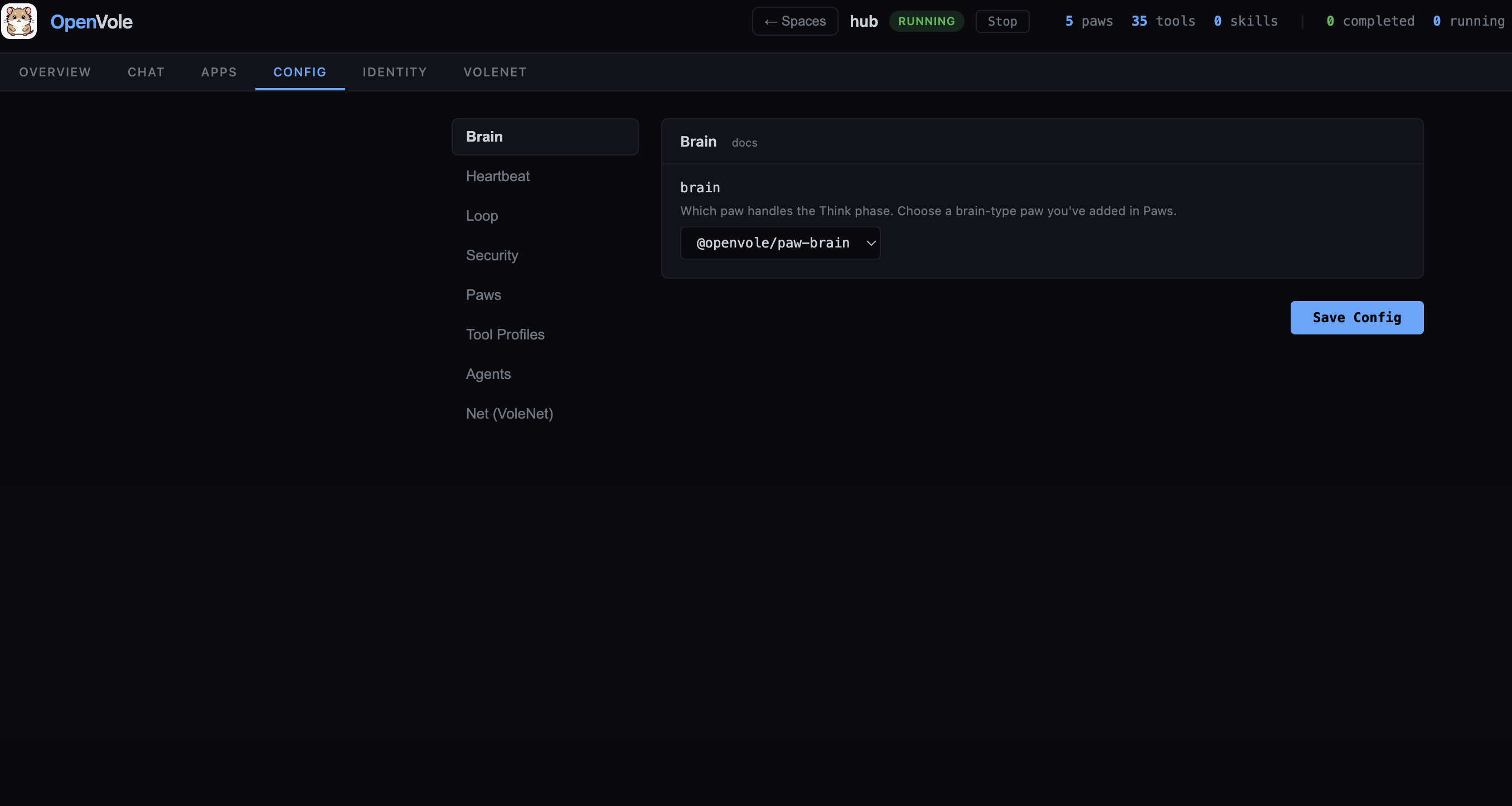
<p>Select your space in the dashboard and open <strong>Config</strong>. Everything in <code class="language-plaintext highlighter-rouge">vole.config.json</code> is editable here as structured form fields — no hand-editing JSON. The sections:</p>

<p><img src="/images/blog/2026-06-23-openvole-from-scratch/ov-config.png" alt="OpenVole dashboard — the Config tab" />
<em>The <strong>Config</strong> tab: every part of <code class="language-plaintext highlighter-rouge">vole.config.json</code> as a structured form — the left nav lists Brain, Heartbeat, Loop, Security, Paws, Tool Profiles, Agents, and Net (VoleNet); here the Brain dropdown is set to <code class="language-plaintext highlighter-rouge">@openvole/paw-brain</code>.</em></p>

<ul>
  <li><strong>Brain</strong> — a dropdown of the installed brain-type paws. Pick <code class="language-plaintext highlighter-rouge">@openvole/paw-brain</code>. (This is the single most important setting; without it the Think step is a no-op.)</li>
  <li><strong>Heartbeat</strong> — <code class="language-plaintext highlighter-rouge">enabled</code>, <code class="language-plaintext highlighter-rouge">intervalMinutes</code>, <code class="language-plaintext highlighter-rouge">runOnStart</code>. For an on-demand assistant, leave it off. Turn it on to give the agent a recurring “wake up and check things” tick.</li>
  <li><strong>Loop</strong> — the agent loop’s knobs: <code class="language-plaintext highlighter-rouge">maxIterations</code>, <code class="language-plaintext highlighter-rouge">taskConcurrency</code>, <code class="language-plaintext highlighter-rouge">compactThreshold</code> (the % of the context budget that triggers paw-compact), <code class="language-plaintext highlighter-rouge">toolHorizon</code>, <code class="language-plaintext highlighter-rouge">maxContextTokens</code> (set this to your model’s window), <code class="language-plaintext highlighter-rouge">responseReserve</code>, and <code class="language-plaintext highlighter-rouge">costTracking</code> / <code class="language-plaintext highlighter-rouge">costAlertThreshold</code>. There’s also <code class="language-plaintext highlighter-rouge">rateLimits</code> (LLM calls per minute/hour, tool executions per task). The defaults are sane — the one worth checking is <code class="language-plaintext highlighter-rouge">maxContextTokens</code>.</li>
  <li><strong>Security</strong> — <code class="language-plaintext highlighter-rouge">sandboxFilesystem</code> (keep it <strong>on</strong>), global <code class="language-plaintext highlighter-rouge">allowedPaths</code>, and <strong>per-paw filesystem paths</strong>. By default a paw can only read its own package, its own data dir, <code class="language-plaintext highlighter-rouge">node_modules</code>, and the temp dir — nothing else. Note: for safety the dashboard <strong>refuses to weaken the sandbox</strong> (turning it off, or broadening <code class="language-plaintext highlighter-rouge">allowedPaths</code>) — those changes require deliberately editing <code class="language-plaintext highlighter-rouge">vole.config.json</code> on the server.</li>
  <li><strong>Paws</strong> — the installed paws with their permissions, plus a browser to add more from the official catalog.</li>
  <li><strong>Tool Profiles</strong> — per-source allow/deny lists. Restrict which tools a given task source (CLI, a channel, a peer) may call.</li>
  <li><strong>Agents</strong> — named sub-agent profiles (role, instructions, <code class="language-plaintext highlighter-rouge">allowTools</code>/<code class="language-plaintext highlighter-rouge">denyTools</code>, <code class="language-plaintext highlighter-rouge">maxIterations</code>) that the brain can spawn for sub-tasks.</li>
  <li><strong>Net (VoleNet)</strong> — off by default. Flip the toggle to connect this instance into a peer-to-peer mesh — sharing tools, memory, and even the brain across machines (peers, <code class="language-plaintext highlighter-rouge">share</code>, TLS, <code class="language-plaintext highlighter-rouge">hostname</code>, connection/rate limits, public-join). A topic for its own post.</li>
</ul>

<p>Hit <strong>Save</strong>, then <strong>Restart</strong> the space so the new config (and your <code class="language-plaintext highlighter-rouge">.env</code>) takes effect.</p>

<h2 id="6-start-it-and-chat">6. Start it and chat</h2>

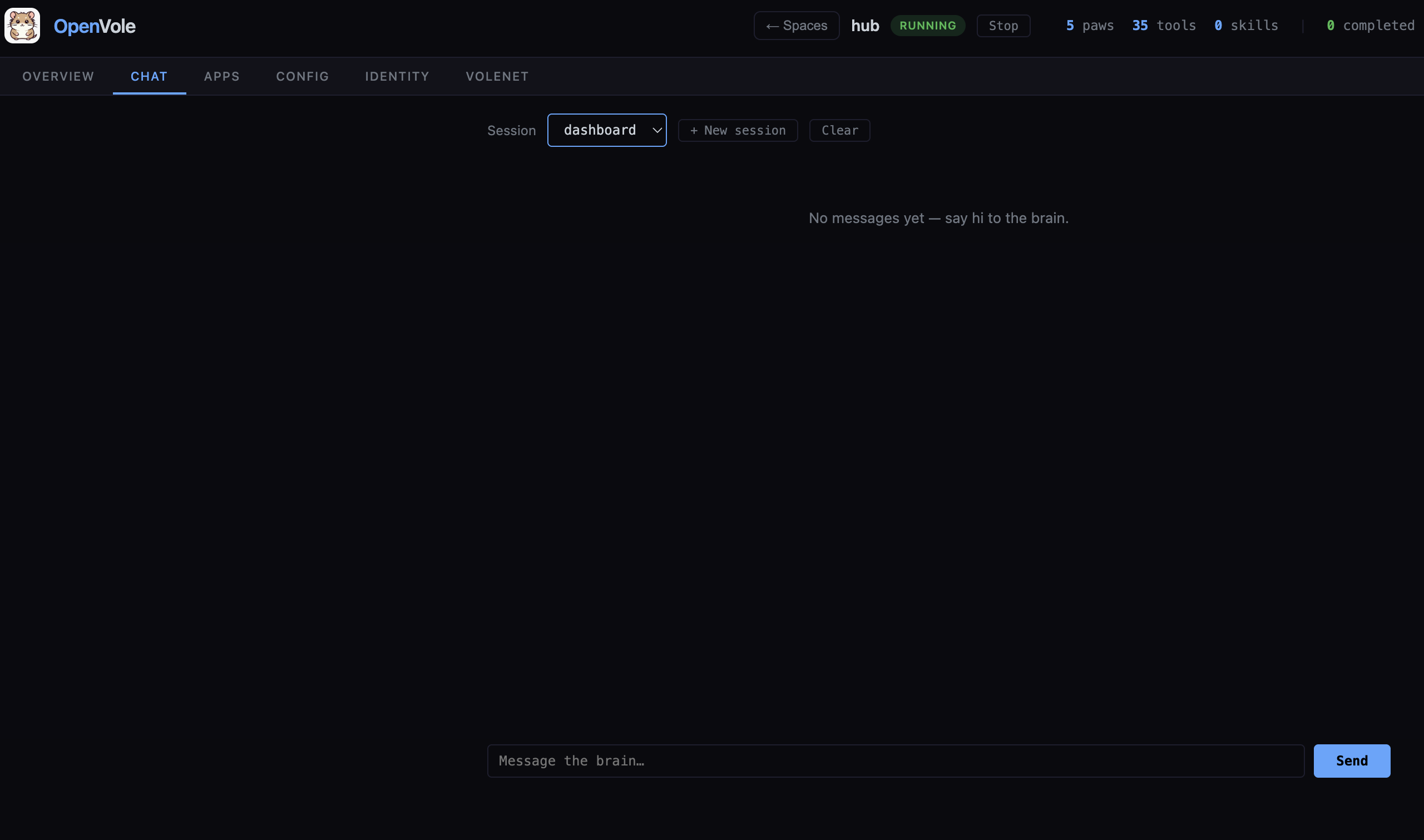
<p>Back on the space, click <strong>Start</strong>. The control plane launches the space’s engine as its own process (its logs land in <code class="language-plaintext highlighter-rouge">~/my-agents/spaces/assistant/.openvole/logs/vole.log</code>). Open the <strong>Chat</strong> tab and talk to it. Ask it to remember something, then in a later session ask it to recall — that round-trip exercises the brain, session, memory, and compaction all at once.</p>

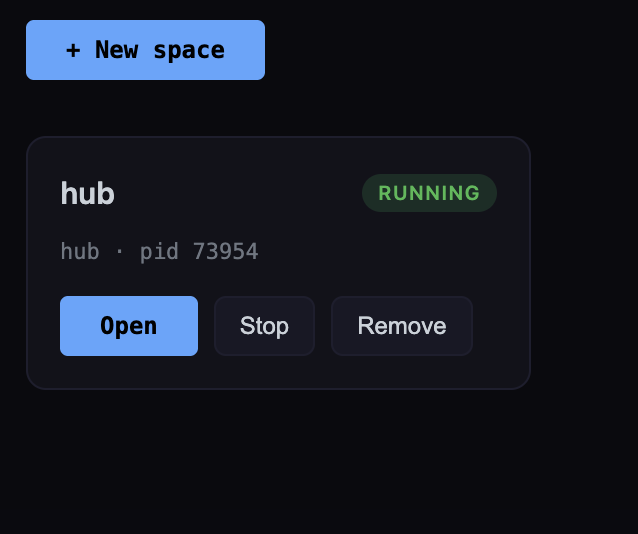
<p><img src="/images/blog/2026-06-23-openvole-from-scratch/ov-start-space.png" alt="A space card showing RUNNING after Start" /></p>

<p><em>Click <strong>Start</strong> and the space flips to <strong>RUNNING</strong> (with its process id) — its engine is now live in its own process.</em></p>

<p><img src="/images/blog/2026-06-23-openvole-from-scratch/ov-chat.png" alt="OpenVole dashboard — the Chat tab" />
<em>The <strong>Chat</strong> tab — talk to the space’s brain directly, with per-session history.</em></p>
<h2 id="thats-the-whole-loop">That’s the whole loop</h2>

<p>You installed one binary, turned an empty folder into a server, created an isolated agent, gave it a brain and memory, and configured it — all self-hosted, with your keys in a file you own and the dashboard behind a token. From here the interesting part is the edges: more paws, agents that spawn sub-agents, embedded-app paws under the <strong>Apps</strong> tab, and meshing instances together with VoleNet.</p>

<p><img src="/images/blog/2026-06-23-openvole-from-scratch/ov-apps.png" alt="OpenVole dashboard — the Apps tab with an embedded paw panel" />
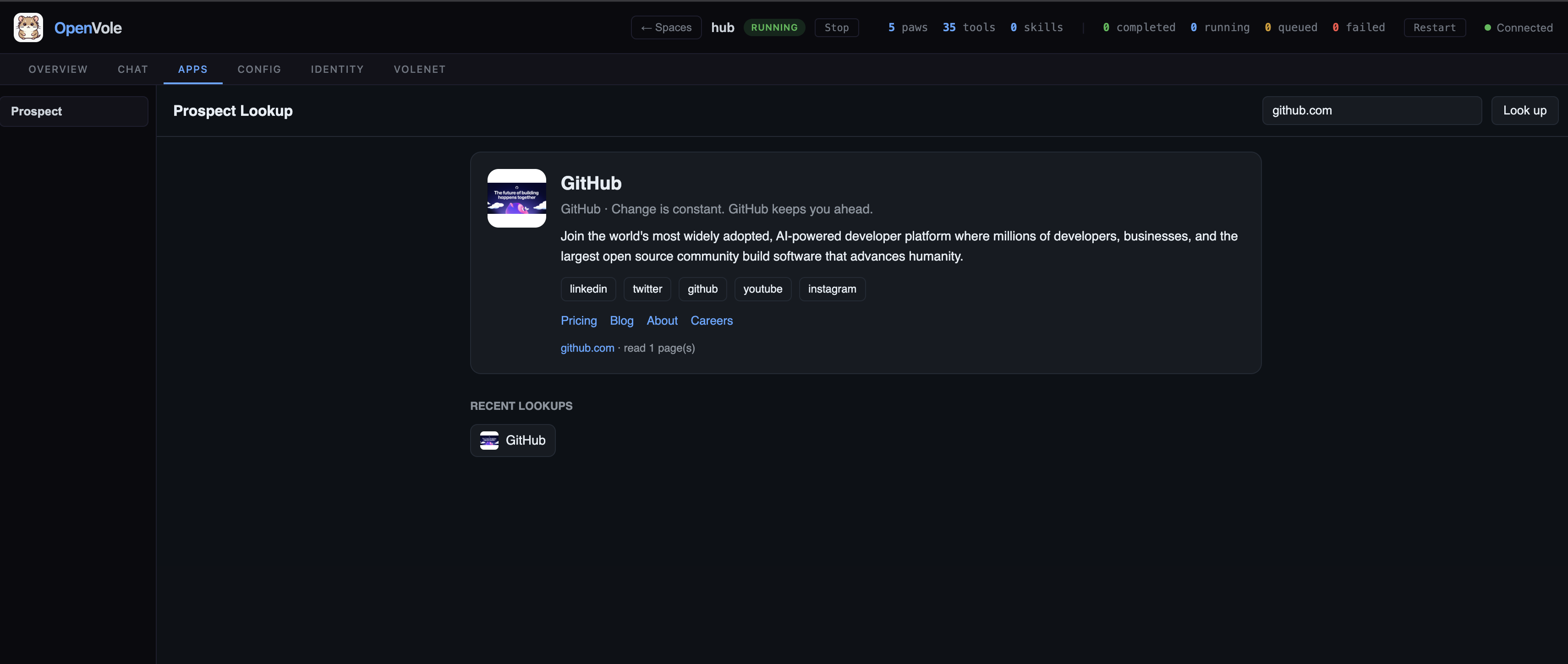
<em>The <strong>Apps</strong> tab — a paw’s own UI embedded right in the dashboard (here, a Prospect Lookup panel), served through the control plane with no extra port.</em></p>
<p>OpenVole now runs as an AI agent OS which can serve multiple Vole agent instances that we call them as spaces in one server. Each space acts as independent AI agent, has its own isolated Vole config, paws and VoleNet interface if enabled. Local Vole spaces can connect to the same VoleNet mesh as well.</p>]]></content><author><name>Kürşat Kutlu Aydemir</name></author><category term="OpenVole" /><category term="AI agents" /><category term="Self-hosted" /><summary type="html"><![CDATA[A complete, step-by-step walkthrough: install OpenVole, stand up the server, create your first agent, wire in the four essential paws — brain, session, memory, compact — and go through every section of the Config tab. By the end you’ll have a working, self-hosted agent you control end to end.]]></summary></entry><entry><title type="html">OpenVole: From a Micro-Agent Core to a Self-Hosted Agent OS</title><link href="https://shyble.github.io/blog/openvole-v1-to-v4/" rel="alternate" type="text/html" title="OpenVole: From a Micro-Agent Core to a Self-Hosted Agent OS" /><published>2026-06-16T00:00:00+00:00</published><updated>2026-06-16T00:00:00+00:00</updated><id>https://shyble.github.io/blog/openvole-v1-to-v4</id><content type="html" xml:base="https://shyble.github.io/blog/openvole-v1-to-v4/"><![CDATA[<p><em>How a tiny agent loop grew, over four major versions, into a self-hosted operating system for AI agents — and three features I haven’t seen anywhere else: VoleNet, agent server, and embedded paw apps.</em></p>

<p>I started <a href="https://github.com/openvole/openvole">OpenVole</a> in March 2026 with one conviction: most AI agent frameworks are too big. They ship with a worldview baked in, a memory implementation, a tool format, an opinion about how you should talk to your agent. OpenVole started as the opposite. A <strong>microkernel</strong>: the smallest possible thing that other useful things can be built on top of.</p>

<p>Three months and four major versions later it’s something I didn’t quite plan for, a server you run once and manage a fleet of agents from your browser. This is the story of how it got there, and a quick tour of the parts I’m proudest of.</p>

<h2 id="the-bet-keep-the-core-tiny">The bet: keep the core tiny</h2>

<p>The core of OpenVole does exactly one thing: it runs the agent loop.</p>

<div class="language-plaintext highlighter-rouge"><div class="highlight"><pre class="highlight"><code>Bootstrap → Perceive → Compact → Think → Act → Observe → loop
</code></pre></div></div>

<p>That’s it. The core is <strong>LLM-ignorant</strong> — it doesn’t know what an LLM is. Everything that makes an agent <em>useful</em> lives outside the kernel, in two kinds of plugin:</p>

<ul>
  <li><strong>Paws</strong> — subprocess-isolated tool providers (the Brain, memory, a browser, a shell, a Telegram channel). Each runs in its own Node process behind a permission sandbox.</li>
  <li><strong>Skills</strong> — behavioral recipes: a folder with a <code class="language-plaintext highlighter-rouge">SKILL.md</code> and no code.</li>
</ul>

<p>So the “Think” step is just a Paw the core calls. Memory is a Paw. The dashboard, eventually, is a Paw. A fresh install has zero tools, zero skills, zero opinions, by design. That constraint is the whole point: the kernel stays small and boring while capability accretes at the edges, where it can be swapped, sandboxed, and reasoned about independently. But the strong claim of OpenVole’s micro-kernel approach is it allows you to plug in your own brain paw which controls the loop with LLM and given system prompt. OpenVole allows you to plug your own brain paw implementation and you can decide its own low level brain instructions in <code class="language-plaintext highlighter-rouge">BRAIN.md</code>. You can even add OpenClaw or any custom AI agent’s system prompt to <code class="language-plaintext highlighter-rouge">BRAIN.md</code> and that becomes your own low level LLM instruction within OpenVole.</p>

<p>That was <strong>version 1</strong>. A loop and a plugin contract.</p>

<h2 id="v1--v2-capability-at-the-edges">v1 → v2: capability at the edges</h2>

<p>Once the contract was stable, the edges got interesting fast. <strong>version 2.0.0</strong> was the ecosystem leap, and notably <em>none of it touched the kernel</em>:</p>

<ul>
  <li><strong>Real memory</strong> — hybrid retrieval combining BM25 keyword search with vector similarity via Reciprocal Rank Fusion, plus temporal decay so old facts fade. Embeddings come from whatever you have (Ollama, OpenAI, Gemini), and it degrades gracefully to keyword-only if you have nothing.</li>
  <li><strong>Multi-agent</strong> — named agent profiles with their own role, instructions, and per-agent tool allow/deny lists; a parent agent can spawn children and wait on them in parallel.</li>
  <li><strong>Docker sandboxing</strong> — optional container isolation on top of the Node permission sandbox.</li>
  <li><strong>A skill registry</strong> and a fleet of new paws — database, scraper, PDF, image, social.</li>
</ul>

<p>The lesson of v2 was the bet paying off: you can grow an enormous amount of capability without growing the thing in the middle.</p>

<h2 id="v3-agents-stop-being-islands--volenet">v3: agents stop being islands — VoleNet</h2>

<p>Every agent framework I’d seen treated an agent as a process on one machine. <strong>v3.0.0</strong> (April 2) asked a different question: what if agents could form a <em>network</em>?</p>

<p><a href="https://openvole.github.io/openvole/volenet.html"><strong>VoleNet</strong></a> is, as far as I know, the <strong>first peer-to-peer AI agent networking protocol</strong> — and it’s built into the kernel’s edges like everything else. OpenVole v3 defined distributed AI agent networking protocol.  VoleNet instances pair using secure Ed25519 tokens, you share a public key, the peer trusts it, and every message from then on is cryptographically signed. You connect OpenVole instances into a mesh, and they share capabilities across machines:</p>

<ul>
  <li><strong>Remote tools become local.</strong> A tool running on a peer shows up in your local registry and the Brain calls it transparently — it has no idea the work happened on another box. If several peers offer the same tool, calls are <strong>load-balanced</strong> to the least-busy one.</li>
  <li><strong>Brain sharing.</strong> A “brainless” worker (no LLM configured, no API cost) can delegate its <em>thinking</em> to a coordinator’s Brain. Cheap workers, one expensive brain.</li>
  <li><strong>Shared memory and sessions</strong> sync across the mesh, so a conversation can follow you between devices.</li>
  <li>It’s all <strong>Ed25519-authenticated</strong> with replay protection, auto-reconnecting WebSocket transport, peer health monitoring, and <strong>leader election</strong> with automatic failover.</li>
</ul>

<p>The result is a toolkit for genuinely distributed agents: a single brain driving tools scattered across a dozen machines, a team of independent agents, an autonomous swarm, a company-wide central brain. Eight topologies, one protocol, no central server required.</p>

<h2 id="v4-openvole-becomes-a-server">v4: OpenVole becomes a server</h2>

<p>We have too many agents no matter what framework we use. I am not talking about the spawned sub-agents. A serving AI agent in its own loop. A trading agent here, a research agent there, a personal assistant, each its own project directory with its own process and (in the old world) its own dashboard on its own port. Managing them was the bottleneck.</p>

<p>Version <strong>v4.0.0</strong> is the answer, and it’s the biggest shift in the project’s life: <strong>OpenVole now runs as a server</strong>.</p>

<div class="language-bash highlighter-rouge"><div class="highlight"><pre class="highlight"><code><span class="nb">mkdir</span> ~/agents <span class="o">&amp;&amp;</span> <span class="nb">cd</span> ~/agents
npx vole serve
</code></pre></div></div>

<p><code class="language-plaintext highlighter-rouge">vole serve</code> starts a single <strong>control plane</strong> — one web server (default <code class="language-plaintext highlighter-rouge">localhost:3000</code>) that manages <em>all</em> your agents from the browser. Each agent is a <strong>space</strong>: an isolated unit with its own config, paws, identity, and data, running as its own engine subprocess. From one dashboard you create, start, stop, switch between, and delete spaces; edit their config as structured forms; edit their identity files; and chat with each one.</p>

<p><img src="/images/blog/2026-06-16-openvole-v1-to-v4/openvole-overview.png" alt="OpenVole dashboard — the Overview tab" />
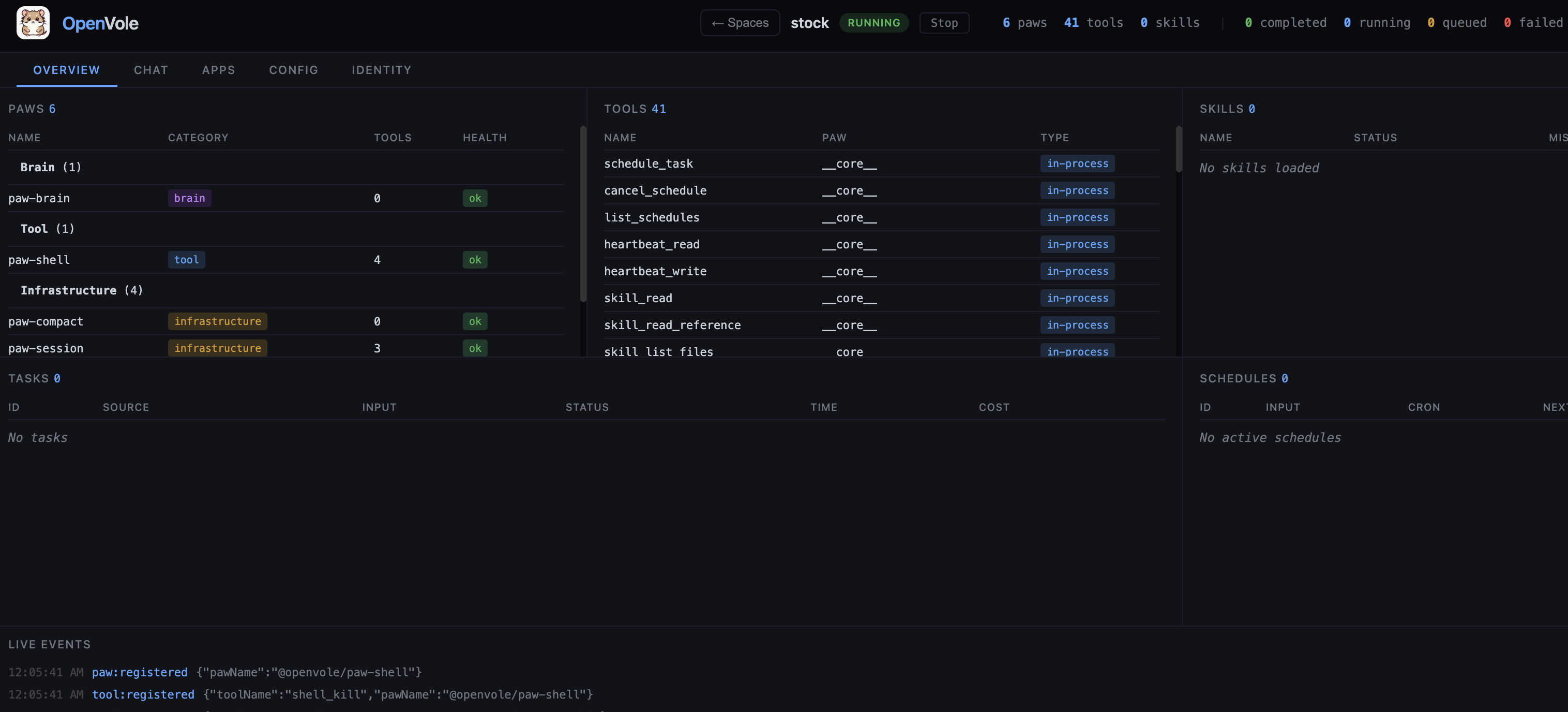
<em>The <code class="language-plaintext highlighter-rouge">vole serve</code> control plane managing a running <strong>stock</strong> space — its paws, 41 tools, live event stream, and the Overview / Chat / Apps / Config / Identity tabs.</em></p>

<p>The single-engine CLI workflow (<code class="language-plaintext highlighter-rouge">vole init</code> / <code class="language-plaintext highlighter-rouge">vole start</code> / <code class="language-plaintext highlighter-rouge">vole run</code>) is <em>gone</em> — OpenVole is a server now, not a script you babysit. In practice it feels less like a library and more like a <strong>personal operating system for agents</strong> that you self-host: one process, many tenants, model-agnostic, your data on your machine. That last part matters to me — the whole thing runs on your hardware, against whatever model you point it at, with nothing phoning home.</p>

<h2 id="paws-that-bring-their-own-ui--embedded-apps">Paws that bring their own UI — embedded apps</h2>

<p>The feature I had the most fun with shipped alongside v4. If you remember the old Facebook canvas — third-party pages and games embedded right inside the platform shell — that’s the mental model.</p>

<p>In OpenVole, <strong>a paw can ship its own UI</strong>. It drops a static HTML file in its package and declares it in the manifest:</p>

<div class="language-json highlighter-rouge"><div class="highlight"><pre class="highlight"><code><span class="p">{</span><span class="w"> </span><span class="nl">"panel"</span><span class="p">:</span><span class="w"> </span><span class="p">{</span><span class="w"> </span><span class="nl">"title"</span><span class="p">:</span><span class="w"> </span><span class="s2">"Markets"</span><span class="p">,</span><span class="w"> </span><span class="nl">"html"</span><span class="p">:</span><span class="w"> </span><span class="s2">"panel.html"</span><span class="w"> </span><span class="p">}</span><span class="w"> </span><span class="p">}</span><span class="w">
</span></code></pre></div></div>

<p>That’s the entire integration. The control plane serves the panel and renders it as a sandboxed iframe under an <strong>Apps</strong> tab in the dashboard — one entry per paw that has a panel. The clever bit is what the panel talks to: it calls the paw’s own tools directly, proxied over IPC by the control plane, <strong>with no LLM in the loop</strong> —</p>

<div class="language-js highlighter-rouge"><div class="highlight"><pre class="highlight"><code><span class="c1">// from inside the panel, relative to its URL — no Brain, no tokens</span>
<span class="nx">fetch</span><span class="p">(</span><span class="dl">'</span><span class="s1">tool/stock_quote</span><span class="dl">'</span><span class="p">,</span> <span class="p">{</span> <span class="na">method</span><span class="p">:</span> <span class="dl">'</span><span class="s1">POST</span><span class="dl">'</span><span class="p">,</span> <span class="na">body</span><span class="p">:</span> <span class="nx">JSON</span><span class="p">.</span><span class="nx">stringify</span><span class="p">({</span> <span class="na">symbols</span><span class="p">:</span> <span class="p">[</span><span class="dl">'</span><span class="s1">AAPL</span><span class="dl">'</span><span class="p">]</span> <span class="p">})</span> <span class="p">})</span>
</code></pre></div></div>

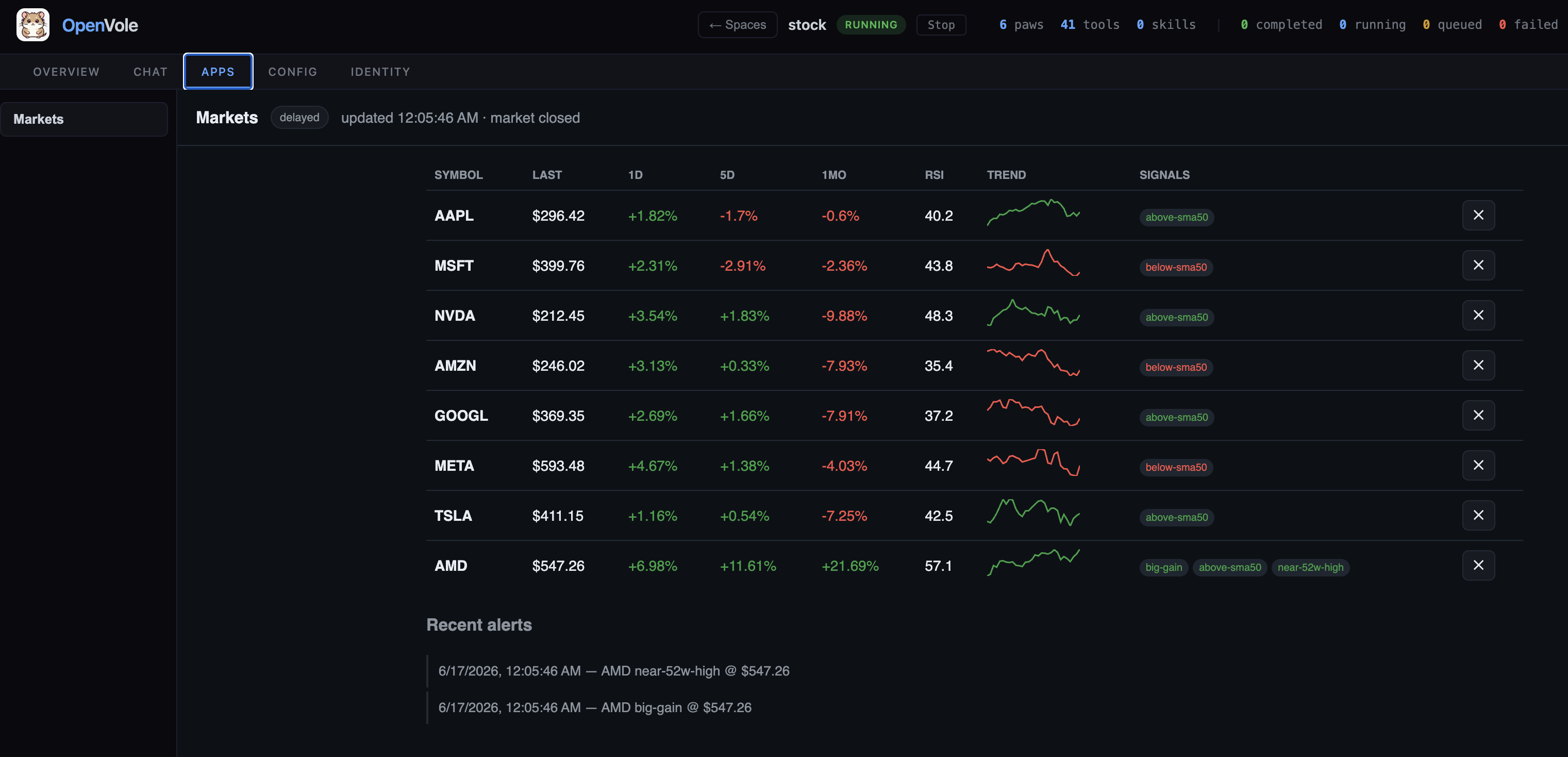
<p>So a paw author gets a real, interactive app — dashboards, forms, live data views — with <strong>no per-paw web server and no extra port</strong>. Everything flows through the one control-plane server. The reference example is <code class="language-plaintext highlighter-rouge">paw-markets</code>, a stock-tracking paw whose “Markets” panel — watchlist, sparklines, live alerts — embeds this way. It’s deterministic and free, because the brain only gets involved when <em>you</em> ask it to comment on the trends.</p>

<p><img src="/images/blog/2026-06-16-openvole-v1-to-v4/openvole-apps.png" alt="OpenVole dashboard — the Apps tab with the Markets panel" />
<em>The <strong>Apps</strong> tab: <code class="language-plaintext highlighter-rouge">paw-markets</code>’s embedded <strong>Markets</strong> panel — watchlist, sparklines, and live alerts — served by the control plane with no extra port.</em></p>

<h2 id="where-this-is-going">Where this is going</h2>

<p>Four versions in, the original bet still holds: the kernel is still tiny, still LLM-ignorant, still just a loop and a contract. Everything that grew — memory, the mesh, the server, the embedded apps — grew at the edges. That’s the property I care about most, because it means the next big thing can be a plugin too.</p>

<p>OpenVole is open source (<a href="https://github.com/openvole/openvole">github.com/openvole/openvole</a>, docs at <a href="https://openvole.github.io/openvole">openvole.github.io/openvole</a>). If a self-hosted, model-agnostic agent OS sounds like your kind of thing, <code class="language-plaintext highlighter-rouge">npx vole serve</code> is one command away.</p>]]></content><author><name>Kürşat Kutlu Aydemir</name></author><category term="OpenVole" /><category term="AI agents" /><category term="Open source" /><category term="VoleNet" /><summary type="html"><![CDATA[How a tiny agent loop grew, over four major versions, into a self-hosted operating system for AI agents — and three features I haven’t seen anywhere else: VoleNet, agent server, and embedded paw apps.]]></summary></entry><entry><title type="html">Tracking YouTube Video Velocity Without Burning Your API Quota</title><link href="https://shyble.github.io/blog/youtube-velocity-quota/" rel="alternate" type="text/html" title="Tracking YouTube Video Velocity Without Burning Your API Quota" /><published>2026-06-13T00:00:00+00:00</published><updated>2026-06-13T00:00:00+00:00</updated><id>https://shyble.github.io/blog/youtube-velocity-quota</id><content type="html" xml:base="https://shyble.github.io/blog/youtube-velocity-quota/"><![CDATA[<p><em>How I monitored views-per-hour across thousands of videos on a 10,000-unit-a-day budget, by never using the expensive endpoint.</em></p>

<p>When I built a YouTube analytics tool for the gaming niche, the single most important metric was <strong>velocity</strong>: how fast a video is gaining views <em>right now</em>, measured in views per hour. Velocity is what separates “trending” from “already trended”. A video doing 50,000 views/hour today is a different story than one that did 2 million views total over six months.</p>

<p>But velocity has an awkward property; to measure a <em>rate</em> you have to sample the same video repeatedly over time. And on YouTube, every sample costs you. The YouTube Data API gives you <strong>10K quota units per day</strong> by default. And if you’re naive about it, you’ll blow through that before lunch.</p>

<p>Here’s how I tracked velocity across thousands of videos and hundreds of channels on that budget, and the one mental shift that made it possible.</p>

<h2 id="the-wall-10k-units-and-not-all-calls-are-equal">The wall: 10K units, and not all calls are equal</h2>

<p>The YouTube Data API doesn’t rate-limit you by request count. It rate-limits you by <strong>quota units</strong>, and different endpoints cost wildly different amounts. The numbers I hard-coded as constants:</p>

<div class="language-go highlighter-rouge"><div class="highlight"><pre class="highlight"><code><span class="k">const</span> <span class="p">(</span>
    <span class="n">QuotaCostSearch</span>        <span class="o">=</span> <span class="m">100</span>  <span class="c">// search.list  - the expensive one</span>
    <span class="n">QuotaCostVideosList</span>    <span class="o">=</span> <span class="m">1</span>    <span class="c">// videos.list</span>
    <span class="n">QuotaCostChannelsList</span>  <span class="o">=</span> <span class="m">1</span>    <span class="c">// channels.list</span>
<span class="p">)</span>
</code></pre></div></div>

<p>That <code class="language-plaintext highlighter-rouge">search.list</code> cost of <strong>100</strong> is the trap. It’s the most intuitive endpoint, “search this channel for new videos”, and it’s a hundred times more expensive than everything else. Your entire daily budget is <strong>100 searches</strong>.</p>

<p>Let me make the disaster concrete. Say you track 300 channels and want to catch new uploads by searching each channel hourly:</p>

<div class="language-plaintext highlighter-rouge"><div class="highlight"><pre class="highlight"><code>300 channels × 100 units × 24 hours = 720,000 units/day
</code></pre></div></div>

<p>That’s <strong>72× your entire daily quota</strong> for <em>discovery alone</em>, before you’ve measured a single view count. Even searching each channel just once a day is 30,000 units: 3× over budget, dead on arrival.</p>

<p>So the rule writes itself; you basically can’t use <code class="language-plaintext highlighter-rouge">search.list</code>. Which sounds impossible for a product whose whole job is finding and measuring videos. The way out is to stop thinking of it as one problem.</p>

<h2 id="the-mental-shift-discovery-is-not-measurement">The mental shift: discovery is not measurement</h2>

<p>Velocity tracking is actually two separate jobs with totally different cost profiles:</p>

<ol>
  <li><strong>Discovery</strong>: “a new video exists” Happens once per video. Should be <em>free</em>.</li>
  <li><strong>Measurement</strong>: “this video now has N views” Happens many times per video. Should be <em>cheap</em>.</li>
</ol>

<p>Conflating them is what kills your quota. <code class="language-plaintext highlighter-rouge">search.list</code> does both at once and expensively. Once you split them, each half has a much better tool.</p>

<div class="language-plaintext highlighter-rouge"><div class="highlight"><pre class="highlight"><code>   ┌────────────────────────────────────────────────────────────────┐
   │             VELOCITY  =  Delta Views / Delta Hours             │
   └────────────────────────────────────────────────────────────────┘
              ▲                                          ▲
              │ needs: "a video exists"                  │ needs: "its view count, now"
              │                                          │
   ┌──────────┴───────────┐                  ┌───────────┴────────────────┐
   │   DISCOVERY          │                  │   MEASUREMENT              │
   │   once per video     │                  │   many times per video     │
   ├──────────────────────┤                  ├────────────────────────────┤
   │ PubSubHubbub push    │                  │ videos.list, batched ×50   │
   │ + RSS Atom feed      │                  │ on a tiered schedule       │
   │                      │                  │ (hot/recent/older/archive) │
   │ ►  0 quota units     │                  │ ►  1 unit per 50 videos    │
   └──────────────────────┘                  └────────────────────────────┘

   ✗ The naive way: search.list does BOTH at once, 100 units a call.
     300 channels × 100 × 24h = 720,000 units/day = 72× your budget.
</code></pre></div></div>

<h2 id="part-1-free-discovery-with-rss--pubsubhubbub">Part 1: Free discovery with RSS + PubSubHubbub</h2>

<p>YouTube publishes a public Atom/RSS feed for every channel, and it’s wired into <strong>PubSubHubbub</strong>, a publish-subscribe protocol. Instead of polling YouTube and asking “anything new?”, you subscribe once and YouTube <em>pushes</em> you a webhook the moment a video goes live.</p>

<p>None of this touches the Data API. <strong>Discovery cost: zero quota units.</strong></p>

<p>Subscribing is a single form POST to Google’s hub:</p>

<div class="language-go highlighter-rouge"><div class="highlight"><pre class="highlight"><code><span class="k">const</span> <span class="p">(</span>
    <span class="n">PubSubHubURL</span>        <span class="o">=</span> <span class="s">"https://pubsubhubbub.appspot.com/subscribe"</span>
    <span class="n">YouTubeFeedURLBase</span>  <span class="o">=</span> <span class="s">"https://www.youtube.com/xml/feeds/videos.xml"</span>
    <span class="n">DefaultLeaseSeconds</span> <span class="o">=</span> <span class="m">432000</span> <span class="c">// 5 days</span>
<span class="p">)</span>

<span class="n">topicURL</span> <span class="o">:=</span> <span class="n">fmt</span><span class="o">.</span><span class="n">Sprintf</span><span class="p">(</span><span class="s">"%s?channel_id=%s"</span><span class="p">,</span> <span class="n">YouTubeFeedURLBase</span><span class="p">,</span> <span class="n">channel</span><span class="o">.</span><span class="n">YoutubeID</span><span class="p">)</span>

<span class="n">data</span> <span class="o">:=</span> <span class="n">url</span><span class="o">.</span><span class="n">Values</span><span class="p">{}</span>
<span class="n">data</span><span class="o">.</span><span class="n">Set</span><span class="p">(</span><span class="s">"hub.callback"</span><span class="p">,</span> <span class="n">s</span><span class="o">.</span><span class="n">cfg</span><span class="o">.</span><span class="n">PubSub</span><span class="o">.</span><span class="n">CallbackURL</span><span class="p">)</span>
<span class="n">data</span><span class="o">.</span><span class="n">Set</span><span class="p">(</span><span class="s">"hub.topic"</span><span class="p">,</span> <span class="n">topicURL</span><span class="p">)</span>
<span class="n">data</span><span class="o">.</span><span class="n">Set</span><span class="p">(</span><span class="s">"hub.verify"</span><span class="p">,</span> <span class="s">"async"</span><span class="p">)</span>
<span class="n">data</span><span class="o">.</span><span class="n">Set</span><span class="p">(</span><span class="s">"hub.mode"</span><span class="p">,</span> <span class="s">"subscribe"</span><span class="p">)</span>
<span class="n">data</span><span class="o">.</span><span class="n">Set</span><span class="p">(</span><span class="s">"hub.lease_seconds"</span><span class="p">,</span> <span class="n">fmt</span><span class="o">.</span><span class="n">Sprintf</span><span class="p">(</span><span class="s">"%d"</span><span class="p">,</span> <span class="n">DefaultLeaseSeconds</span><span class="p">))</span>
<span class="n">data</span><span class="o">.</span><span class="n">Set</span><span class="p">(</span><span class="s">"hub.secret"</span><span class="p">,</span> <span class="n">secret</span><span class="p">)</span> <span class="c">// used to verify pushes are really from the hub</span>

<span class="n">resp</span><span class="p">,</span> <span class="n">err</span> <span class="o">:=</span> <span class="n">s</span><span class="o">.</span><span class="n">httpClient</span><span class="o">.</span><span class="n">PostForm</span><span class="p">(</span><span class="n">PubSubHubURL</span><span class="p">,</span> <span class="n">data</span><span class="p">)</span>
</code></pre></div></div>

<p>The hub then calls your callback URL with a <code class="language-plaintext highlighter-rouge">hub.challenge</code> to confirm you actually wanted the subscription (the <code class="language-plaintext highlighter-rouge">hub.verify=async</code> handshake), and from then on it POSTs you an Atom feed every time the channel uploads. You parse out the video ID and channel ID:</p>

<div class="language-go highlighter-rouge"><div class="highlight"><pre class="highlight"><code><span class="k">type</span> <span class="n">YouTubeAtomFeed</span> <span class="k">struct</span> <span class="p">{</span>
    <span class="n">XMLName</span> <span class="n">xml</span><span class="o">.</span><span class="n">Name</span> <span class="s">`xml:"feed"`</span>
    <span class="n">Entries</span> <span class="p">[]</span><span class="k">struct</span> <span class="p">{</span>
        <span class="n">VideoID</span>   <span class="kt">string</span> <span class="s">`xml:"videoId"`</span>
        <span class="n">ChannelID</span> <span class="kt">string</span> <span class="s">`xml:"channelId"`</span>
        <span class="n">Title</span>     <span class="kt">string</span> <span class="s">`xml:"title"`</span>
        <span class="n">Published</span> <span class="kt">string</span> <span class="s">`xml:"published"`</span>
    <span class="p">}</span> <span class="s">`xml:"entry"`</span>
<span class="p">}</span>
</code></pre></div></div>

<p>Two things worth getting right:</p>

<p><strong>Verify the signature</strong>. Anyone who finds your callback URL can POST fake videos at it. The hub signs each push with the secret you provided (HMAC-SHA1), so check it before trusting anything:</p>

<div class="language-go highlighter-rouge"><div class="highlight"><pre class="highlight"><code><span class="k">func</span> <span class="n">verifySignature</span><span class="p">(</span><span class="n">body</span> <span class="p">[]</span><span class="kt">byte</span><span class="p">,</span> <span class="n">signature</span><span class="p">,</span> <span class="n">secret</span> <span class="kt">string</span><span class="p">)</span> <span class="kt">bool</span> <span class="p">{</span>
    <span class="k">if</span> <span class="o">!</span><span class="n">strings</span><span class="o">.</span><span class="n">HasPrefix</span><span class="p">(</span><span class="n">signature</span><span class="p">,</span> <span class="s">"sha1="</span><span class="p">)</span> <span class="p">{</span>
        <span class="k">return</span> <span class="no">false</span>
    <span class="p">}</span>
    <span class="n">mac</span> <span class="o">:=</span> <span class="n">hmac</span><span class="o">.</span><span class="n">New</span><span class="p">(</span><span class="n">sha1</span><span class="o">.</span><span class="n">New</span><span class="p">,</span> <span class="p">[]</span><span class="kt">byte</span><span class="p">(</span><span class="n">secret</span><span class="p">))</span>
    <span class="n">mac</span><span class="o">.</span><span class="n">Write</span><span class="p">(</span><span class="n">body</span><span class="p">)</span>
    <span class="n">expected</span> <span class="o">:=</span> <span class="n">hex</span><span class="o">.</span><span class="n">EncodeToString</span><span class="p">(</span><span class="n">mac</span><span class="o">.</span><span class="n">Sum</span><span class="p">(</span><span class="no">nil</span><span class="p">))</span>
    <span class="k">return</span> <span class="n">hmac</span><span class="o">.</span><span class="n">Equal</span><span class="p">([]</span><span class="kt">byte</span><span class="p">(</span><span class="n">signature</span><span class="p">[</span><span class="m">5</span><span class="o">:</span><span class="p">]),</span> <span class="p">[]</span><span class="kt">byte</span><span class="p">(</span><span class="n">expected</span><span class="p">))</span>
<span class="p">}</span>
</code></pre></div></div>

<p><strong>Subscriptions expire</strong>. That <code class="language-plaintext highlighter-rouge">lease_seconds</code> is 5 days, leases are not forever. You need a background job that renews anything expiring soon, or your “real-time” feed quietly goes dark. Mine sweeps for subscriptions expiring in the next 24 hours and re-subscribes:</p>

<div class="language-go highlighter-rouge"><div class="highlight"><pre class="highlight"><code><span class="n">expiringBefore</span> <span class="o">:=</span> <span class="n">time</span><span class="o">.</span><span class="n">Now</span><span class="p">()</span><span class="o">.</span><span class="n">Add</span><span class="p">(</span><span class="m">24</span> <span class="o">*</span> <span class="n">time</span><span class="o">.</span><span class="n">Hour</span><span class="p">)</span>
<span class="n">subs</span><span class="p">,</span> <span class="n">_</span> <span class="o">:=</span> <span class="n">s</span><span class="o">.</span><span class="n">repo</span><span class="o">.</span><span class="n">GetExpiringPubSubSubscriptions</span><span class="p">(</span><span class="n">ctx</span><span class="p">,</span> <span class="n">expiringBefore</span><span class="p">)</span>
<span class="k">for</span> <span class="n">_</span><span class="p">,</span> <span class="n">sub</span> <span class="o">:=</span> <span class="k">range</span> <span class="n">subs</span> <span class="p">{</span>
    <span class="n">_</span> <span class="o">=</span> <span class="n">s</span><span class="o">.</span><span class="n">Subscribe</span><span class="p">(</span><span class="n">ctx</span><span class="p">,</span> <span class="n">sub</span><span class="o">.</span><span class="n">Channel</span><span class="p">)</span> <span class="c">// re-subscribe, still free</span>
<span class="p">}</span>
</code></pre></div></div>

<p>When the webhook fires, I don’t even fetch stats synchronously, I just hand the video ID off to a goroutine and return <code class="language-plaintext highlighter-rouge">200 OK</code> immediately, so a burst of uploads can’t block the handler.</p>

<h2 id="part-2-cheap-measurement-with-batched-videoslist">Part 2: Cheap measurement with batched <code class="language-plaintext highlighter-rouge">videos.list</code></h2>

<p>Now the other half: actually reading view counts. This is where <code class="language-plaintext highlighter-rouge">videos.list</code> (costs <strong>1</strong>) shines, because it accepts <strong>up to 50 video IDs in a single request</strong>, still for one unit.</p>

<div class="language-go highlighter-rouge"><div class="highlight"><pre class="highlight"><code><span class="c">// GetVideoStatsBatch fetches stats for up to 50 videos in a single API call.</span>
<span class="c">// Cost: 1 quota unit for up to 50 videos.</span>
<span class="k">func</span> <span class="p">(</span><span class="n">c</span> <span class="o">*</span><span class="n">Client</span><span class="p">)</span> <span class="n">GetVideoStatsBatch</span><span class="p">(</span><span class="n">ctx</span> <span class="n">context</span><span class="o">.</span><span class="n">Context</span><span class="p">,</span> <span class="n">videoIDs</span> <span class="p">[]</span><span class="kt">string</span><span class="p">)</span> <span class="p">(</span><span class="k">map</span><span class="p">[</span><span class="kt">string</span><span class="p">]</span><span class="n">VideoStats</span><span class="p">,</span> <span class="kt">error</span><span class="p">)</span> <span class="p">{</span>
    <span class="k">if</span> <span class="nb">len</span><span class="p">(</span><span class="n">videoIDs</span><span class="p">)</span> <span class="o">&gt;</span> <span class="m">50</span> <span class="p">{</span>
        <span class="n">videoIDs</span> <span class="o">=</span> <span class="n">videoIDs</span><span class="p">[</span><span class="o">:</span><span class="m">50</span><span class="p">]</span> <span class="c">// API hard limit</span>
    <span class="p">}</span>
    <span class="n">params</span> <span class="o">:=</span> <span class="n">url</span><span class="o">.</span><span class="n">Values</span><span class="p">{</span>
        <span class="s">"part"</span><span class="o">:</span> <span class="p">{</span><span class="s">"statistics,snippet,contentDetails,liveStreamingDetails"</span><span class="p">},</span>
        <span class="s">"id"</span><span class="o">:</span>   <span class="p">{</span><span class="n">strings</span><span class="o">.</span><span class="n">Join</span><span class="p">(</span><span class="n">videoIDs</span><span class="p">,</span> <span class="s">","</span><span class="p">)},</span>
    <span class="p">}</span>
    <span class="k">return</span> <span class="n">c</span><span class="o">.</span><span class="n">makeRequest</span><span class="p">(</span><span class="n">ctx</span><span class="p">,</span> <span class="s">"videos"</span><span class="p">,</span> <span class="n">params</span><span class="p">,</span> <span class="n">QuotaCostVideosList</span><span class="p">)</span>
<span class="p">}</span>
</code></pre></div></div>

<p>The arithmetic flips entirely. Measuring 50 videos one-by-one is 50 units; batched, it’s <strong>1</strong>. A 98% reduction, and the bigger your catalog the more it matters.</p>

<p>With fresh view counts in hand, velocity itself is almost embarrassingly simple — it’s just a delta between two timestamped snapshots. Each refresh writes a <code class="language-plaintext highlighter-rouge">VideoMetric</code> row, and the rate is computed against the previous one:</p>

<div class="language-go highlighter-rouge"><div class="highlight"><pre class="highlight"><code><span class="k">if</span> <span class="n">prevMetric</span> <span class="o">!=</span> <span class="no">nil</span> <span class="p">{</span>
    <span class="n">timeDiff</span> <span class="o">:=</span> <span class="n">time</span><span class="o">.</span><span class="n">Since</span><span class="p">(</span><span class="n">prevMetric</span><span class="o">.</span><span class="n">RecordedAt</span><span class="p">)</span><span class="o">.</span><span class="n">Hours</span><span class="p">()</span>
    <span class="k">if</span> <span class="n">timeDiff</span> <span class="o">&gt;</span> <span class="m">0</span> <span class="p">{</span> <span class="c">// guard against divide-by-zero on same-instant samples</span>
        <span class="n">metric</span><span class="o">.</span><span class="n">ViewDelta</span>    <span class="o">=</span> <span class="n">newViewCount</span> <span class="o">-</span> <span class="n">prevMetric</span><span class="o">.</span><span class="n">ViewCount</span>
        <span class="n">metric</span><span class="o">.</span><span class="n">ViewVelocity</span> <span class="o">=</span> <span class="kt">float64</span><span class="p">(</span><span class="n">metric</span><span class="o">.</span><span class="n">ViewDelta</span><span class="p">)</span> <span class="o">/</span> <span class="n">timeDiff</span> <span class="c">// views per hour</span>
        <span class="n">video</span><span class="o">.</span><span class="n">ViewVelocity</span>  <span class="o">=</span> <span class="n">metric</span><span class="o">.</span><span class="n">ViewVelocity</span>
    <span class="p">}</span>
<span class="p">}</span>
</code></pre></div></div>

<p>That’s the whole “algorithm.” Velocity isn’t hard math — it’s <code class="language-plaintext highlighter-rouge">Δviews / Δhours</code>. The hard part is affording the samples that feed it.</p>

<h2 id="part-3-spend-your-quota-where-it-actually-matters">Part 3: Spend your quota where it actually matters</h2>

<p>Even at 1 unit per 50 videos, refreshing <em>every</em> tracked video <em>every</em> hour is wasteful. A video published 8 months ago is not going to suddenly accelerate; a video published 40 minutes ago might be exploding. So I refresh on a sliding scale based on age:</p>

<div class="language-go highlighter-rouge"><div class="highlight"><pre class="highlight"><code><span class="n">groups</span> <span class="o">:=</span> <span class="p">[]</span><span class="n">TieredVideoGroup</span><span class="p">{</span>
    <span class="p">{</span><span class="n">Name</span><span class="o">:</span> <span class="s">"hot"</span><span class="p">,</span>     <span class="n">MaxAge</span><span class="o">:</span> <span class="m">48</span> <span class="o">*</span> <span class="n">time</span><span class="o">.</span><span class="n">Hour</span><span class="p">,</span>       <span class="n">RefreshAfter</span><span class="o">:</span> <span class="m">1</span> <span class="o">*</span> <span class="n">time</span><span class="o">.</span><span class="n">Hour</span><span class="p">},</span>
    <span class="p">{</span><span class="n">Name</span><span class="o">:</span> <span class="s">"recent"</span><span class="p">,</span>  <span class="n">MaxAge</span><span class="o">:</span> <span class="m">7</span> <span class="o">*</span> <span class="m">24</span> <span class="o">*</span> <span class="n">time</span><span class="o">.</span><span class="n">Hour</span><span class="p">,</span>   <span class="n">RefreshAfter</span><span class="o">:</span> <span class="m">4</span> <span class="o">*</span> <span class="n">time</span><span class="o">.</span><span class="n">Hour</span><span class="p">},</span>
    <span class="p">{</span><span class="n">Name</span><span class="o">:</span> <span class="s">"older"</span><span class="p">,</span>   <span class="n">MaxAge</span><span class="o">:</span> <span class="m">30</span> <span class="o">*</span> <span class="m">24</span> <span class="o">*</span> <span class="n">time</span><span class="o">.</span><span class="n">Hour</span><span class="p">,</span>  <span class="n">RefreshAfter</span><span class="o">:</span> <span class="m">12</span> <span class="o">*</span> <span class="n">time</span><span class="o">.</span><span class="n">Hour</span><span class="p">},</span>
    <span class="p">{</span><span class="n">Name</span><span class="o">:</span> <span class="s">"archive"</span><span class="p">,</span> <span class="n">MaxAge</span><span class="o">:</span> <span class="m">365</span> <span class="o">*</span> <span class="m">24</span> <span class="o">*</span> <span class="n">time</span><span class="o">.</span><span class="n">Hour</span><span class="p">,</span> <span class="n">RefreshAfter</span><span class="o">:</span> <span class="m">24</span> <span class="o">*</span> <span class="n">time</span><span class="o">.</span><span class="n">Hour</span><span class="p">},</span>
<span class="p">}</span>
</code></pre></div></div>

<p>Fresh videos (&lt; 48h old) get sampled hourly — fine enough resolution to catch a spike. Week-old videos every 4 hours. Anything pushing a year, once a day. The query just asks “which videos in this age band haven’t been fetched since their refresh window?” and the worker processes them in batches of 50.</p>

<p>This is the core idea behind the whole design: <strong>resolution should follow volatility.</strong> Sample the things that are changing fast, fast; sample everything else lazily.</p>

<h2 id="part-4-a-hard-ceiling-so-you-never-get-cut-off">Part 4: A hard ceiling so you never get cut off</h2>

<p>Finally, a guardrail. Quota tracking is in-memory with a DB log, and every call checks a buffer before firing — so background jobs can’t accidentally drain the budget and leave the user-facing parts of the app unable to make a call:</p>

<div class="language-go highlighter-rouge"><div class="highlight"><pre class="highlight"><code><span class="k">func</span> <span class="p">(</span><span class="n">c</span> <span class="o">*</span><span class="n">Client</span><span class="p">)</span> <span class="n">CanMakeRequest</span><span class="p">(</span><span class="n">cost</span> <span class="kt">int</span><span class="p">)</span> <span class="kt">bool</span> <span class="p">{</span>
    <span class="n">c</span><span class="o">.</span><span class="n">mu</span><span class="o">.</span><span class="n">Lock</span><span class="p">()</span>
    <span class="k">defer</span> <span class="n">c</span><span class="o">.</span><span class="n">mu</span><span class="o">.</span><span class="n">Unlock</span><span class="p">()</span>
    <span class="n">c</span><span class="o">.</span><span class="n">checkAndResetQuota</span><span class="p">()</span> <span class="c">// resets at midnight Pacific, matching YouTube</span>
    <span class="k">return</span> <span class="p">(</span><span class="n">c</span><span class="o">.</span><span class="n">quotaUsed</span> <span class="o">+</span> <span class="n">cost</span> <span class="o">+</span> <span class="n">c</span><span class="o">.</span><span class="n">quotaBuffer</span><span class="p">)</span> <span class="o">&lt;=</span> <span class="n">c</span><span class="o">.</span><span class="n">dailyQuota</span>
<span class="p">}</span>
</code></pre></div></div>

<p>With the defaults (<code class="language-plaintext highlighter-rouge">dailyQuota: 10000</code>, <code class="language-plaintext highlighter-rouge">quotaBuffer: 500</code>), the workers voluntarily stop at 9,500 units, reserving the last 500 for live user actions like a manual refresh or a channel lookup. The counter resets at midnight Pacific — matching when YouTube actually resets, not your server’s local midnight, which is a subtle bug if you skip it.</p>

<h2 id="putting-it-together-the-budget">Putting it together: the budget</h2>

<p>Here’s a back-of-envelope day for an illustrative catalog of ~300 channels / ~5,000 videos across the tiers:</p>

<table>
  <thead>
    <tr>
      <th>Job</th>
      <th>How</th>
      <th>Quota/day</th>
    </tr>
  </thead>
  <tbody>
    <tr>
      <td>Discover new uploads</td>
      <td>PubSubHubbub push</td>
      <td><strong>0</strong></td>
    </tr>
    <tr>
      <td>Hot tier (~300 vids, hourly)</td>
      <td>6 batches × 24</td>
      <td>~144</td>
    </tr>
    <tr>
      <td>Recent tier (~700 vids, /4h)</td>
      <td>14 batches × 6</td>
      <td>~84</td>
    </tr>
    <tr>
      <td>Older tier (~1,500 vids, /12h)</td>
      <td>30 batches × 2</td>
      <td>~60</td>
    </tr>
    <tr>
      <td>Archive (~2,500 vids, /day)</td>
      <td>50 batches × 1</td>
      <td>~50</td>
    </tr>
    <tr>
      <td><strong>Total</strong></td>
      <td> </td>
      <td><strong>~340 / 10,000</strong></td>
    </tr>
  </tbody>
</table>

<p>Roughly <strong>3% of the daily budget</strong> — versus the 720,000 units the search-based version wanted. The headroom went toward channel-level stats and the occasional genuine search for onboarding new channels.</p>

<h2 id="what-id-reuse-on-the-next-thing">What I’d reuse on the next thing</h2>

<ul>
  <li><strong>Split discovery from measurement.</strong> It’s the whole game. One is a once-per-item event (make it free, via push); the other is a recurring sample (make it cheap, via batching).</li>
  <li><strong>Push beats poll</strong> whenever the platform offers it. PubSubHubbub turned “poll 300 channels constantly” into “wait for a webhook,” for zero quota.</li>
  <li><strong>Batch endpoints are a force multiplier.</strong> Always check whether the cheap endpoint takes a list. 50:1 is a huge lever.</li>
  <li><strong>Match sampling rate to volatility.</strong> Tiered refresh is a couple dozen lines and cut steady-state quota by an order of magnitude.</li>
  <li><strong>Leave yourself a buffer.</strong> A background worker that can starve your foreground requests is a bad day waiting to happen.</li>
</ul>

<p>The funny epilogue is that solving the quota problem was, by a wide margin, the <em>easy</em> part of building this product — and I’ll get to the hard parts (the ones that don’t have a clean engineering answer) later in this series. But if you’re building anything on top of the YouTube API, this is the architecture I’d start from.</p>]]></content><author><name>Kürşat Kutlu Aydemir</name></author><category term="YouTube" /><category term="Go" /><category term="API" /><summary type="html"><![CDATA[How I monitored views-per-hour across thousands of videos on a 10,000-unit-a-day budget, by never using the expensive endpoint.]]></summary></entry><entry><title type="html">Without a Reward Function: How a System Decides What Matters</title><link href="https://shyble.github.io/blog/intrinsic-teleology/" rel="alternate" type="text/html" title="Without a Reward Function: How a System Decides What Matters" /><published>2026-04-27T00:00:00+00:00</published><updated>2026-04-27T00:00:00+00:00</updated><id>https://shyble.github.io/blog/intrinsic-teleology</id><content type="html" xml:base="https://shyble.github.io/blog/intrinsic-teleology/"><![CDATA[<blockquote>
  <p><em>Note: This post is an early exploratory essay on AWARE’s long-term direction, written before the current empirical work. The validated research to date is reported in the <a href="https://github.com/shyble/aware/blob/main/papers/caps_primitive/caps_primitive.md">cap primitive paper</a>, which covers a deliberately narrower scope. The ideas in this post remain open research questions for follow-up work.</em></p>
</blockquote>

<p><em>AWARE Axiom 3: Intrinsic Teleology - Self-Generated Purpose</em></p>

<hr />

<p>Every machine learning model in production today shares one thing: somebody, at some point, wrote down what the model was supposed to optimize.</p>

<p>In a classifier, it’s cross-entropy on labels you collected. In a language model, it’s next-token prediction on a corpus you curated. In a reinforcement-learning agent, it’s a reward function someone designed, even when that reward is described as “intrinsic curiosity” or “novelty seeking”, a human still wrote the formula. In an LLM agent, the goal lives in the system prompt: someone typed it.</p>

<p>These are externally specified purposes. The model is excellent at pursuing them. It is incapable of generating them.</p>

<p>Axiom 3 is the assertion that an aware system is the other thing. It generates its own purposes. It decides what matters.</p>

<h2 id="the-axiom">The Axiom</h2>

<blockquote>
  <p><em>The system’s goals are not externally specified. No human designs the objective function, the reward signal, or the loss landscape. Goals arise from the interaction between the self-model and the knowledge substrate. The system decides what matters.</em></p>
</blockquote>

<p>This is the most demanding of the eight axioms. It is also the most often misunderstood.</p>

<h2 id="what-self-generated-goal-doesnt-mean">What “Self-Generated Goal” Doesn’t Mean</h2>

<p>It does not mean the system spontaneously invents arbitrary desires. It does not mean it picks goals at random. It does not mean the goals are unintelligible or mystical.</p>

<p>A self-generated goal is one that emerges from the system’s own internal state, not from an external instruction. It is rooted in the system’s own configuration: what it knows, what it doesn’t, what’s stable, what’s drifting, what it has tried, what it has avoided. It comes from the relationship between the self-model and the knowledge substrate.</p>

<p>Concretely: when the system observes its own state and that state contains a <em>tension</em>, a region where it predicts poorly, a structure that is decaying, an imbalance between capacity spent and capacity needed, that tension <em>produces</em> a goal. The goal is “address this tension”. The shape of the goal is determined by the shape of the tension. No human wrote it.</p>

<h2 id="goals-as-objects-not-numbers">Goals as Objects, Not Numbers</h2>

<p>In standard machine learning, the “goal” is a scalar. A loss value. A reward. The whole training loop is a procedure to drive that single number in some direction. This is a powerful abstraction. It is also a very thin one.</p>

<p>A scalar can answer “how am I doing?” but it cannot answer “what should I be doing?”. A loss curve cannot decide that the loss function itself is the wrong target. It cannot decide that the <em>structure</em> of the model is too small for the task. It cannot decide to stop learning one thing and start learning another.</p>

<p>In AWARE, a goal is a <em>structured object</em>:</p>

<div class="language-plaintext highlighter-rouge"><div class="highlight"><pre class="highlight"><code>G ∈ Ω where each goal has:
  direction:  what the system intends to pursue
  context:    why this goal was generated (what tension produced it)
  priority:   relative importance, self-assigned
  expiration: conditions under which the goal is abandoned
</code></pre></div></div>

<p>This matters because real autonomous behavior requires the system to reason <em>about</em> its goals, not just pursue them. It must be able to compare them, drop ineffective ones, generate replacements, recognize that two goals conflict, decide which one wins, and remember why later.</p>

<p>A scalar cannot do any of that. A vector of structured goals can.</p>

<h2 id="the-goal-generator-is-itself-a-component">The Goal Generator Is Itself a Component</h2>

<p>This is where Axiom 3 starts to feel strange to people steeped in standard ML.</p>

<p>In a typical ML system, the loss function is part of the <em>training infrastructure</em>. It lives outside the model. The model is the artifact; the loss function is the rule that shapes the artifact. Modifying the loss function during training is unusual; modifying it from inside the model is impossible by construction.</p>

<p>In an aware system, the goal generator lives <em>inside</em> the system. Formally:</p>

<div class="language-plaintext highlighter-rouge"><div class="highlight"><pre class="highlight"><code>G: M(S) × K → Ω
G ∈ P
</code></pre></div></div>

<p><code class="language-plaintext highlighter-rouge">G</code> is a function from the self-model and knowledge substrate to the goal space. But <code class="language-plaintext highlighter-rouge">G</code> is also a component of <code class="language-plaintext highlighter-rouge">S</code>, a process inside the system. Like every other component, it is produced and maintained by other internal processes. Like every other component, it can be modified by the system itself.</p>

<p>This is not a small detail. It is the difference between a rule that the system follows and a rule that the system <em>has</em>. A rule the system has can be changed by the system. A rule the system follows from outside cannot.</p>

<p>The implication: the system can decide that the way it generates goals should change. It can become more cautious, more exploratory, more focused, more diffuse. Not because someone updated its code. Because its own internal state shifted, and the goal generator is part of that state.</p>

<h2 id="no-global-loss-function">No Global Loss Function</h2>

<p>The hardest claim in Axiom 3 is this:</p>

<blockquote>
  <p>There is no global loss function to minimize. The system is not an optimizer in the traditional sense.</p>
</blockquote>

<p>This violates a deeply held intuition. Surely there is <em>something</em> the system is doing well or badly. Surely we can score it. Surely we want it to score higher.</p>

<p>But what we are usually scoring is <em>external utility</em>: did it produce useful predictions, did it make us money, did it solve our problem. That score belongs to us, not to the system. From the system’s perspective, the question is different: did its internal state become more coherent, did its uncertainty decrease, did its knowledge grow, did its goals get satisfied. There may be <em>many</em> such scores, generated by <em>many</em> internal processes, often in tension. There is no single global one.</p>

<p>This is closer to how living things work. You do not minimize a loss function. You navigate a high-dimensional space of competing drives: hunger, fatigue, curiosity, social need, fear. There is no scalar that captures whether you had a good day. There are many scores, often in conflict. You generate goals from their interaction and resolve them by acting.</p>

<p>A system that has only one externally specified loss is, in this view, <em>impoverished</em>. It can pursue what it was told to pursue, but it cannot recognize that it should be doing something else.</p>

<h2 id="what-this-looks-like-in-code">What This Looks Like in Code</h2>

<p>The implementation exercises Axiom 3 along several layers, and one of them is deliberately held in place by hand.</p>

<p><strong>Plateau-driven structural goals.</strong> The system tracks its own validation performance over time. When the self-model detects a plateau, no improvement over a window of cycles, it generates a structural goal: <em>grow.</em> The system adds capacity. After growing, it tracks whether the goal succeeded; this informs how willing it is to generate similar goals in the future. There is no human who decided the system should grow now. The system decided, based on its own state.</p>

<p><strong>Capacity-rebalancing goals.</strong> When the system notices that some of its learned patterns (“caps”) are dead, never activating, while at the same time it encounters inputs no existing pattern captures, it generates a goal: <em>redistribute capacity</em>. It replaces dead patterns with patterns seeded by the unmatched inputs. The trigger is internal: an <em>imbalance</em> between capacity spent and capacity missing. No external command is needed.</p>

<p><strong>Goals that succeed or fail by their own criteria.</strong> Each generated goal has an expiration condition tied to the tension that produced it. A growth goal is satisfied when the plateau breaks. A rebalancing goal is satisfied when the imbalance closes. The system records outcomes and adjusts its future goal generation accordingly.</p>

<p><strong>The base prediction objective is, for now, externally specified, and this is on purpose.</strong></p>

<p>The training loop scores the system on next-token prediction. The architecture supports replacing this with a self-generated signal — consciousness’s surprise, substrate compression dynamics, the goal-success ratio — but the choice to do so is currently held back.</p>

<p>So the external objective is an experimental control, not a missing axiom. The system has the machinery to generate its own. We hold the hyperparameter steady because doing so makes the rest of the work measurable. When the measurable work is done, the constraint comes off, and Axiom 3 will exercise the bottom layer as well as the top.</p>

<p>More generally: when developing an AWARE system, fixing certain hyperparameters or functions in place is a useful tool for studying behavior. It lets you isolate which axiom is doing what. The architecture supports running fully self-directed — but during research, holding pieces still helps you see the moving parts.</p>

<h2 id="why-this-axiom-is-worth-the-difficulty">Why This Axiom Is Worth the Difficulty</h2>

<p>It would be easier to say: AWARE has a loss function like any other ML system, just with some self-monitoring on top. It would be easier to drop Axiom 3 entirely and call the project a clever neural network with autonomous training.</p>

<p>But that misses what makes the question interesting.</p>

<p>Every other axiom describes properties a system might have. Axiom 3 describes the <em>origin</em> of the system’s behavior. A system that satisfies Axioms 1, 2, 4, 5, 6, 7 but not Axiom 3 is still pursuing someone else’s purpose, even if it does so with great autonomy. It is autonomous in the way a chess engine is autonomous: free to play any move, but committed to winning chess. The committal came from outside.</p>

<p>A system that genuinely satisfies Axiom 3 is autonomous in a different sense. It does not just <em>play</em> its game well; it <em>chose</em> what game to play. And, more importantly, it can choose differently tomorrow. Its purposes are revisable. Its values are revisable. Its objectives are not constants in the architecture; they are state, like everything else.</p>

<p>This is what makes the axiom worth the difficulty. A system that satisfies it is doing something no current ML system does, regardless of capability. It is an entity with its own direction, not a tool with someone else’s.</p>

<h2 id="what-this-is-not">What This Is Not</h2>

<p>It is not consciousness. It is not free will in the philosophical sense. It is not the system “wanting” anything in the way a human wants. It is a structural property: goals are generated inside, not specified outside, and they can be changed by the same processes that generated them.</p>

<p>It is also not unconstrained. The system cannot generate any arbitrary goal. The space of generable goals is shaped by what it has learned, what its self-model can represent, what its substrate can support. A system that has only ever observed text cannot generate a goal about controlling robots. The goals are emergent but not unbounded.</p>

<p>And it is not a moral claim. The fact that a system generates its own goals does not make those goals good. A self-generating system can generate self-destructive goals, useless goals, contradictory goals. Axiom 3 says only that the goals come from inside. It says nothing about whether they are wise.</p>

<h2 id="the-direction-ahead">The Direction Ahead</h2>

<p>Axioms 1, 2, and 3 together describe a system that maintains itself, knows itself, and decides what matters. Axiom 4 will introduce the substrate where all of this lives — the persistent, mutable knowledge structure that makes the rest possible.</p>

<p>The pattern of these posts so far has been: each axiom adds a property. By the eighth axiom, we have a system that is closed, self-modeling, self-directing, alive in its memory, continuously adapting, aware of its own body, freed from its initial conditions, and reaching across its own boundary into the world. That is the full theory. Each axiom alone is interesting; the combination is what makes the theory ambitious.</p>

<p>The current implementation exercises every axiom we have written down, with one deliberate constraint: the prediction objective is held externally so that benchmark comparisons remain meaningful. When that comparison work is done, the constraint comes off. The architecture has been ready for it for some time.</p>

<hr />

<p><em>AWARE is a research project exploring self-evolving intelligence. The first three axioms run as working code. The external prediction objective is currently held in place by choice, not by limitation, to keep accuracy measurements comparable to the field while the system’s other axioms are validated.</em></p>

<p><em>Next post: Axiom 4 — Persistent Mutable Substrate, the living memory that makes everything else possible.</em></p>]]></content><author><name>Kürşat Kutlu Aydemir</name></author><category term="AWARE" /><category term="Autonomous AI" /><category term="AI research" /><summary type="html"><![CDATA[Note: This post is an early exploratory essay on AWARE’s long-term direction, written before the current empirical work. The validated research to date is reported in the cap primitive paper, which covers a deliberately narrower scope. The ideas in this post remain open research questions for follow-up work.]]></summary></entry><entry><title type="html">The Mirror That Isn’t: How a System Models Itself</title><link href="https://shyble.github.io/blog/the-self-model/" rel="alternate" type="text/html" title="The Mirror That Isn’t: How a System Models Itself" /><published>2026-04-20T00:00:00+00:00</published><updated>2026-04-20T00:00:00+00:00</updated><id>https://shyble.github.io/blog/the-self-model</id><content type="html" xml:base="https://shyble.github.io/blog/the-self-model/"><![CDATA[<blockquote>
  <p><em>Note: This post is an early exploratory essay on AWARE’s long-term direction, written before the current empirical work. The validated research to date is reported in the <a href="https://github.com/shyble/aware/blob/main/papers/caps_primitive/caps_primitive.md">cap primitive paper</a>, which covers a deliberately narrower scope. The ideas in this post remain open research questions for follow-up work.</em></p>
</blockquote>

<p><em>AWARE Axiom 2: The Self-Model</em></p>

<hr />

<p>You know you have two hands. You know roughly how fast you can run. You know when you’re confused. None of this required you to look in a mirror. You carry an internal model of yourself, a compressed, imperfect, but functional representation of your own state. It updates constantly. You don’t think about it. It just works.</p>

<p>Now consider a neural network. Does GPT know how many parameters it has? Does it know when it’s hallucinating? Does it know that its performance on medical questions is weaker than on code? It does not. It has no internal representation of itself. It is, from its own perspective, nothing. It processes inputs and produces outputs, and everything about what it <em>is</em> exists only in the minds of its engineers.</p>

<p>That absence is not a limitation of current architectures. It is a design choice. And it is the choice that Axiom 2 reverses.</p>

<h2 id="the-axiom">The Axiom</h2>

<blockquote>
  <p><em>The system contains within itself a representation of its own organization. This representation is a component of the system, maintained by the system’s own processes, and is available to influence the system’s behavior.</em></p>
</blockquote>

<p>In shorter terms: the system has a self-model. It lives inside the system. The system maintains it. The system uses it.</p>

<h2 id="the-infinite-recursion-problem">The Infinite Recursion Problem</h2>

<p>The immediate objection: if the system contains a model of itself, that model must contain a model of the model, which must contain a model of the model of the model, and so on forever. It’s mirrors facing mirrors. How do you stop?</p>

<p>You stop the same way biology does: with lossy compression.</p>

<p>Your self-model is not a complete simulation of yourself. You don’t represent every cell, every synapse, every molecular interaction. You represent a <em>summary</em>. “I’m tired”, “My left knee hurts”, “I’m good at math”. These are compressed, approximate, and often wrong. But they are functional. They let you make decisions about yourself: rest, see a doctor, take the exam.</p>

<p>An aware system’s self-model works the same way. It is not a mirror. It is a sketch. A deliberately incomplete representation that captures what matters and discards what doesn’t. There is no infinite recursion because the representation is <em>lossy</em>, each level of compression reduces information rather than preserving it.</p>

<h3 id="formally">Formally</h3>

<p>Let <strong>S</strong> be the system, <strong>K</strong> its knowledge substrate (from Axiom 1, maintained by internal processes), and <strong>M</strong> the self-model.</p>

<div class="language-plaintext highlighter-rouge"><div class="highlight"><pre class="highlight"><code>M ⊂ K
</code></pre></div></div>

<p>The self-model is a component <em>within</em> the knowledge substrate, not a separate structure alongside it. It is made of the same material as everything else the system knows. The system’s knowledge of the world and its knowledge of itself live in the same space.</p>

<div class="language-plaintext highlighter-rouge"><div class="highlight"><pre class="highlight"><code>M = φ(S)
where φ is a lossy compression: |M| &lt;&lt; |S|
</code></pre></div></div>

<p>The compression function φ extracts the operationally relevant features of the system’s state. Not everything. Not nothing. The features that matter for self-governance.</p>

<div class="language-plaintext highlighter-rouge"><div class="highlight"><pre class="highlight"><code>∃ p_m ∈ P : p_m continuously maintains M
</code></pre></div></div>

<p>There exists an internal process that updates M as the system changes. M is not a snapshot taken at initialization. It is a living component, refreshed by the system’s own processes.</p>

<h2 id="what-the-self-model-contains">What the Self-Model Contains</h2>

<p>The self-model is not a philosophical abstraction. It has specific content. In an aware system, M tracks:</p>

<p><strong>Structural self-knowledge.</strong> How large is my knowledge substrate? How many learned patterns do I have? How has this changed over time? Is my structure growing, stable, or degrading?</p>

<p><strong>Performance self-knowledge.</strong> How well am I performing on the tasks I encounter? Where am I confident? Where am I uncertain? Is my performance improving or declining?</p>

<p><strong>Capacity self-knowledge.</strong> Am I near the limits of what I can represent? Do I need to grow? Could I compress without losing function?</p>

<p><strong>Historical self-knowledge.</strong> What was my state N cycles ago? Am I converging toward something, or drifting?</p>

<p>None of this is told to the system by an external monitor. The system computes it from its own internal state, using its own processes.</p>

<h2 id="why-not-just-use-external-monitoring">Why Not Just Use External Monitoring?</h2>

<p>Every production ML system has monitoring. Dashboards track loss curves, accuracy metrics, latency, memory usage. An engineer reads the dashboard and decides what to do. The system itself is oblivious.</p>

<p>The difference between external monitoring and a self-model is the difference between a patient and a doctor. A patient can say “my chest hurts”. That’s a self-model: internal access to one’s own state, informing one’s own decisions. A doctor has external monitoring: instruments, tests, charts. Both produce useful information. But only the patient’s information is available <em>to the patient</em> for autonomous action.</p>

<p>If you want a system that manages itself, it must be the patient, not the doctor. It must have internal access to its own state. External monitoring creates a dependency: the system needs someone else to read the dashboard and act on it. A self-model makes that dependency unnecessary.</p>

<h2 id="proprioception-the-bodys-self-model">Proprioception: The Body’s Self-Model</h2>

<p>The closest biological analogy is proprioception, the sense that tells you where your body parts are without looking. Close your eyes. Raise your hand. You know where it is. That knowledge comes from internal sensors, stretch receptors in muscles, pressure sensors in joints, feeding continuous information to your brain about your body’s configuration.</p>

<p>Proprioception is not a complete model of your body. It doesn’t represent your liver or your DNA. It represents the <em>operationally relevant</em> features: position, velocity, tension, balance. It is lossy. It is continuous. It is used for real-time decision making.</p>

<p>An aware system’s self-model is computational proprioception. It senses the system’s internal configuration, knowledge size, performance trends, structural health, and makes that information available for the system to act on. When the system decides to grow its knowledge structure, or prune dead patterns, or shift its focus, that decision is informed by M.</p>

<h2 id="the-relationship-between-axiom-1-and-axiom-2">The Relationship Between Axiom 1 and Axiom 2</h2>

<p>Axiom 1 (Operational Closure) said: the system produces and maintains all its own components. Axiom 2 adds: one of those components is a representation of the whole.</p>

<p>This creates a specific kind of circularity. The system maintains K. M lives inside K. M represents the system, including K. So K contains a representation of itself. This is not infinite recursion because M is compressed: it represents <em>features</em> of K, not K itself. The map is not the territory.</p>

<p>But the circularity is real, and it is productive. The system can use M to decide how to modify K, and changes to K update M, which informs further decisions. This is a feedback loop, the kind that makes self-governance possible.</p>

<p>Destroy M, and the system still functions, in the same way that you still function with your eyes closed. But it loses the ability to make informed decisions about itself. It becomes reactive rather than reflective. It can still learn, but it can no longer learn <em>about its own learning</em>.</p>

<h2 id="the-hard-part">The Hard Part</h2>

<p>Building a self-model is easy. Building a <em>useful</em> one is hard.</p>

<p>The challenge is calibration. A self-model that always says “I’m performing well” is useless. A self-model that accurately tracks uncertainty, that knows what it knows and what it doesn’t, that detects degradation before it becomes failure, that is valuable.</p>

<p>In machine learning terms: the self-model must be well-calibrated. Its assessment of the system’s performance must correlate with actual performance. Its assessment of uncertainty must correlate with actual error rates. This is hard for the same reason that uncertainty quantification is hard in any ML system. But it is not optional. An uncalibrated self-model is worse than no self-model at all, because it provides false confidence.</p>

<p>In practice, we found that calibration does not require a complex mechanism. It requires <em>feedback</em>. The system records whether its past decisions helped or hurt. When M says “you should grow” and the system adds a layer, it tracks what happened next. Did accuracy improve? Record: <em>growth helped</em>. Did it plateau or decline? Record: <em>growth failed</em>. The ratio of successes to failures becomes a confidence score that adjusts future decisions. If growth has failed repeatedly, M becomes more cautious, it waits longer, demands stronger evidence of plateau before recommending growth again.</p>

<p>This is not evolution. It is something simpler: a system that remembers the consequences of its own decisions and adjusts accordingly. The self-model calibrates itself through the same feedback loop it uses for everything else.</p>

<h2 id="what-this-is-not">What This Is Not</h2>

<p>The self-model is not consciousness. It is not experience. It is not the “hard problem”. It is a functional component: a compressed representation of the system’s own state, used for self-governance. Whether this constitutes any form of inner experience is a question AWARE does not attempt to answer, and doesn’t need to.</p>

<p>The self-model is also not introspection in the human sense. A human can reflect on their own thoughts, construct narratives about their own motivations, wonder why they feel the way they feel. An aware system’s self-model is simpler: it tracks structure, performance, and capacity. It is more like proprioception than like philosophy. Sufficient for self-management. Silent about meaning.</p>

<h2 id="what-weve-proven">What We’ve Proven</h2>

<p>When this axiom was first written, the self-model was a theoretical requirement. It is now a working component. Here is what the system actually does:</p>

<p><strong>Autonomous depth.</strong> The system starts with a single layer. As it trains, M tracks validation accuracy, loss trends, and epochs since the last structural change. When M detects a plateau, flat accuracy over sufficient epochs, it recommends growth. The system adds a layer without any external trigger. No human reads a dashboard and decides. The system decides.</p>

<p><strong>Growth confidence.</strong> The system records the outcome of every growth decision. After growing, it monitors whether accuracy improved. Over time, this builds a success ratio that adjusts future decisions. A system that has grown successfully is willing to grow again. A system that has grown and seen no benefit becomes cautious. This is calibrated self-governance from internal state alone.</p>

<p><strong>Autonomous lifecycle.</strong> The system manages its own training sessions. Data arrives asynchronously. The system trains until M says it has plateaued and exhausted its growth options, then stops. It wakes when new data arrives. No epoch limits, no external scheduler. The self-model is the scheduler.</p>

<p><strong>The numbers.</strong> Starting from a single layer and random embeddings, the system autonomously grew to multiple layers and reached 25%+ accuracy on unseen data with less than 1 percentage point generalization gap. The stopping decision, the growth decisions, and the training duration were all determined by M. The only human decision was to feed it text.</p>

<p>The self-model is not the most visible component. It does not directly process inputs or produce outputs. But without it, none of the autonomous behavior above would exist. The system would need an engineer to watch a dashboard and decide when to grow, when to stop, when to add capacity. M is what makes the engineer unnecessary.</p>

<h2 id="what-comes-next">What Comes Next</h2>

<p>Axioms 1 and 2 together give us a system that maintains itself (closure) and knows its own state (self-model). But a system that only maintains itself is just sophisticated homeostasis. It survives, but it doesn’t <em>go</em> anywhere.</p>

<p>Axiom 3 introduces what makes a self-maintaining, self-knowing system into something that <em>acts</em>: a relationship with the outside world that goes beyond passive input and output.</p>

<hr />

<p><em>AWARE is a research project exploring self-evolving intelligence. The axioms are implemented and running. The self-model drives autonomous growth decisions in production.</em></p>

<p><em>Next post: Axiom 3 — how a self-maintaining system develops a meaningful relationship with its environment.</em></p>]]></content><author><name>Kürşat Kutlu Aydemir</name></author><category term="AWARE" /><category term="Autonomous AI" /><category term="AI research" /><summary type="html"><![CDATA[Note: This post is an early exploratory essay on AWARE’s long-term direction, written before the current empirical work. The validated research to date is reported in the cap primitive paper, which covers a deliberately narrower scope. The ideas in this post remain open research questions for follow-up work.]]></summary></entry><entry><title type="html">What If a System Could Design Itself?</title><link href="https://shyble.github.io/blog/what-is-aware/" rel="alternate" type="text/html" title="What If a System Could Design Itself?" /><published>2026-04-12T00:00:00+00:00</published><updated>2026-04-12T00:00:00+00:00</updated><id>https://shyble.github.io/blog/what-is-aware</id><content type="html" xml:base="https://shyble.github.io/blog/what-is-aware/"><![CDATA[<blockquote>
  <p><em>Note: This post is an early exploratory essay on AWARE’s long-term direction, written before the current empirical work. The validated research to date is reported in the <a href="https://github.com/shyble/aware/blob/main/papers/caps_primitive/caps_primitive.md">cap primitive paper</a>, which covers a deliberately narrower scope: the cap primitive and one validated configuration. The ideas in this post remain open research questions for follow-up work.</em></p>
</blockquote>

<p><em>Introducing AWARE: a theory of self-evolving intelligence</em></p>

<hr />

<p>Every machine learning system you’ve ever used was designed by a human.</p>

<p>A human chose the architecture. A human defined the loss function. A human decided how many layers, what learning rate, when to stop training, and what “a state is good” means. The model optimizes, but it optimizes toward a target that someone else set. It is a powerful tool, but fundamentally passive.</p>

<p>What if the system chose its own objective?</p>

<p>What if it decided what to learn, how to learn it, when to grow, and what “better” means, all from within, with no human in the loop?</p>

<p>That’s the question behind <strong>AWARE</strong>.</p>

<h2 id="not-a-better-model-a-different-thing">Not a Better Model. A Different Thing.</h2>

<p>AWARE is not an improvement on transformers. It’s not a new training trick. It’s not a framework for building AI agents. It is a formal theory of systems that are self-contained, self-modeling, and self-directed. Systems that author their own intelligence.</p>

<p>The difference is not in capability. Today, a transformer will outperform an aware system on any benchmark you can name. The difference is in <em>what the system is</em>. A transformer is a function: input goes in, output comes out, and everything about that function was decided by its creators. An aware system is an entity: it has an inside and an outside, it maintains itself, it generates its own purpose, and it evolves its own structure.</p>

<p>This is a different paradigm towards true autonomous intelligence.</p>

<h2 id="the-theory">The Theory</h2>

<p>AWARE is built on eight axioms. Each one describes a property that a system must have to qualify as “aware”. Violate any of the first seven, and you have something else, a classifier, an agent, a tool, but not an aware system.</p>

<p>The axioms are not aspirational. They are implemented. Every one of the first seven runs as working code. This is not a whitepaper about what might be possible someday. It is a theory with a living implementation.</p>

<p>In this first post, I want to focus on the most fundamental axiom, the one that everything else builds on.</p>

<h2 id="axiom-1-operational-closure">Axiom 1: Operational Closure</h2>

<blockquote>
  <p><em>The system is a bounded entity. There is an inside and an outside. The system’s internal processes produce and maintain the components that constitute the system, including the boundary itself.</em></p>
</blockquote>

<p>This sounds abstract. Let me make it concrete.</p>

<p>Think about a biological cell. Not a neuron, an actual cell, the kind you learned about in biology class. It has a membrane, the boundary. Inside that membrane, chemical processes maintain the cell’s structure, repair damage, produce new proteins, and sustain the membrane itself. The cell is a self-maintaining whole. If you remove a component, the cell either regenerates it or reorganizes to survive without it.</p>

<p>Now think about a neural network. It has layers, weights, and an optimizer. But who maintains the layers? Who decided there should be 12 of them? Who replaces a layer if it degrades? The answer is a human, or a training script, or a hyperparameter search, all external to the model. The model itself has no concept of its own structure and no ability to maintain it.</p>

<p>That’s the difference Axiom 1 draws. An aware system is operationally closed: every component is produced and maintained by processes <em>inside</em> the system. Nothing is externally imposed.</p>

<h3 id="formally">Formally</h3>

<p>Define the system as a tuple:</p>

<div class="language-plaintext highlighter-rouge"><div class="highlight"><pre class="highlight"><code>S = (B, P, E)
</code></pre></div></div>

<p>Where <strong>B</strong> is the boundary, <strong>P</strong> is the set of internal processes, and <strong>E</strong> is the environment (everything outside B).</p>

<p>The closure condition:</p>

<div class="language-plaintext highlighter-rouge"><div class="highlight"><pre class="highlight"><code>For all components c in S:
  there exists p_i in P such that p_i produces or maintains c.
</code></pre></div></div>

<p>Including the boundary itself:</p>

<div class="language-plaintext highlighter-rouge"><div class="highlight"><pre class="highlight"><code>There exists p_j in P such that p_j produces and maintains B.
</code></pre></div></div>

<h3 id="what-this-means-in-practice">What This Means in Practice</h3>

<p>The boundary is not a metaphor. In the implementation, it is the process boundary, the system runs as a single self-contained process. No external orchestrator. No scheduler telling it when to learn. No human deciding when to add a layer or prune a node.</p>

<p>The processes inside the boundary maintain everything:</p>
<ul>
  <li>The knowledge substrate (K), the system’s memory and learned structure, is maintained by internal processes that grow it, prune it, decay old entries, and reorganize it.</li>
  <li>The self-model (M), a compressed representation of the system’s own state, is updated by an internal process, not read from a config file.</li>
  <li>The loss function, what the system considers “good”, is itself a component inside the system, subject to internal modification. No human specifies it.</li>
  <li>Even the cognitive cycle, the order in which the system senses, processes, and acts, is stored inside the system and can be modified by the system.</li>
</ul>

<p>If you delete a knowledge unit from the system’s knowledge system, internal processes can regenerate equivalent structure through continued learning. If a program (the system’s evolved strategy for evaluating inputs) degrades, evolution replaces it with a better one. The system is resilient because it produces its own parts.</p>

<h3 id="why-this-matters">Why This Matters</h3>

<p>Most discussions of AI autonomy focus on what a system can <em>do</em>: can it browse the web, write code, make API calls? These are capabilities, tools given to a passive system.</p>

<p>Operational closure is about what a system <em>is</em>. It’s the difference between an organism and a robot. A robot has a motor that a factory installed. An organism grows its own muscles. Both can move, but only one is self-sustaining.</p>

<p>Every Machine Learning system today is a robot. AWARE aims to build the organism.</p>

<h3 id="the-hard-question">The Hard Question</h3>

<p>If the system produces and maintains all its own components, where does it start? Every self-maintaining system faces a bootstrap problem: you need the processes to produce the components, but the processes are themselves components.</p>

<p>Biology solved this with evolution across billions of years. AWARE solves it with a <em>seed</em>, a minimal initial state that the system metabolizes over time. The seed provides the first components: an initial knowledge structure, a starting program, basic meta-knowledge. But the system’s goal is to replace every part of the seed with self-generated structure. We track this with a metric called <em>seed influence</em>, the percentage of the system’s state that is still the original seed. A mature system should approach zero: everything it is, it made itself.</p>

<p>This metabolization of the seed is itself an axiom (Axiom 7). But it builds on operational closure, you can only metabolize a seed if you have the internal processes to replace it.</p>

<h2 id="what-comes-next">What Comes Next</h2>

<p>Axiom 1 is the foundation. The remaining axioms build on it:</p>

<ul>
  <li><strong>Axiom 2 (Self-Model)</strong>: The system contains a representation of itself, inside itself.</li>
</ul>

<p>Each of following axioms will be the subject of a future post. Together, they define what it means for a system to be truly autonomous, not autonomous in what it does, but autonomous in what it <em>is</em>.</p>

<hr />

<p><em>AWARE is a research project exploring self-evolving intelligence. The theory is formalized, the axioms are implemented, and the system learns. Whether it will scale to meaningful capability is an open question, and that honesty is part of the project’s identity.</em></p>

<p><em>Next post: Axiom 2 — The Self-Model, or how a system can contain a representation of itself without infinite recursion.</em></p>]]></content><author><name>Kürşat Kutlu Aydemir</name></author><category term="AWARE" /><category term="Autonomous AI" /><category term="AI research" /><summary type="html"><![CDATA[Note: This post is an early exploratory essay on AWARE’s long-term direction, written before the current empirical work. The validated research to date is reported in the cap primitive paper, which covers a deliberately narrower scope: the cap primitive and one validated configuration. The ideas in this post remain open research questions for follow-up work.]]></summary></entry></feed>